


Have you heard about the popular open source tool used for searching and indexing that is used by giants like Wikipedia and Linkedin? No, I’m pretty sure you may have heard it in passing.
Yes, I’m talking about Elasticsearch. In this blog, you’ll get to know the basics of Elasticsearch, its advantages, how to install it and indexing the documents using Elasticsearch. ‹
What is Elasticsearch?
Elasticsearch is an open-source, enterprise-grade search engine which can power extremely fast searches that support all data discovery applications. With Elasticsearch we can store, search, and analyse big volumes of data quickly and in near real time. It is generally used as the underlying search engine that powers applications that have simple/complex search features and requirements.
Advantages of Elasticsearch
BUILT ON TOP OF LUCENE “ Being built on top of Lucene, it offers the most powerful full-text search capabilities.
DOCUMENT-ORIENTED “ It stores complex entities as structured JSON documents and indexes all fields by default, providing a higher performance.
SCHEMA FREE “ It stores a large quantity of semi-structured (JSON) data in a distributed fashion. It also attempts to detect the data structure, index the data present and makes it search-friendly.
FULL-TEXT SEARCH “ Elasticsearch performs linguistic searches against documents and returns the documents that matches the search condition. Result relevancy for the given query is calculated using TF/IDF algorithm.
RESTFUL API “ Elasticsearch supports REST API which is light-weight protocol. We can query Elasticsearch using the REST API with Chrome plug-in Sense. Sense provides a simple user interface. Sense plugin has features like autocomplete Elasticsearch query syntax, copying the query as cURL command.
Terminologies
CLUSTER: A cluster is a collection of nodes that share data.
NODE: A node is a single server that is part of the cluster, stores the data, and participates in the cluster’s indexing and search capabilities.
INDEX: An index is a collection of documents with similar characteristics. An index is more equivalent to a schema in RDBMS.
TYPE: There can be multiple types within an index. For example, an e-commerce application can have used products in one type and new products in another type of the same index. One index can have multiple types as multiple tables in one database.
DOCUMENT: A document is a basic unit of information that can be indexed. It is like a row in a table.
SHARDS and REPLICAS: Elastic Search indexes are divided into multiple pieces called shards, which allows the index to scale horizontally. Elastic Search also allows us to make copies of index shards, which are called replicas.
Usecases
E-commerce websites use elasticsearch to index their entire product catalogue and inventory with all the product attributes with which the end user can search against.
So whenever a user searches for a product on the website, the corresponding query will hit an index which has millions of products and it will retrieve the product in near real time.
You want to collect log or transaction data and want to analyse and mine this data to look for statistics, summarisations, or anomalies.
In this case, you can index this data into Elasticsearch. Once the data is in Elasticsearch, we can visualise the data in timelion/d3.js to understand the collected logs better.
Installation
Let’s assume that you are in a Linux based environment. Assuming that you also have JDK 6 or above installed, let’s get on with downloading Elasticsearch using the command below:

Then extract it.

Go to the folder where Elasticsearch has been installed.

To start the Elasticsearch server,
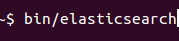
You can access it at https://localhost:9200 on your web browser. Here, localhost denotes the host (server), and the default port of Elasticsearch is 9200.
To confirm everything is working fine, type https://localhost:9200 in your browser and you should see something like this.
{
name : 90AzDAw ,
cluster_name : elasticsearch ,
cluster_uuid : e6t_hv6eQCi280elcktrUQ ,
version : {
number : 5.4.0 ,
build_hash : 780f8c4 ,
build_date : 2017-04-28T17:43:27.229Z ,
build_snapshot : false,
lucene_version : 6.5.0
},
tagline : You Know, for Search
}
Indexing Documents
Elasticsearch tends to use Lucene indexes to store & retrieve data. Adding data‘ to Elasticsearch is known as indexing. While performing an indexing operation, Elasticsearch converts raw data into its internal documents. Each document is nothing but a mere set of correlating keys and values: Here, the keys are strings and the values would be one of the numerous data types such as strings, numbers, lists, and dates, etc.
We can query Elasticsearch using the methods mentioned below :
-cURL command
-Using an HTTP client
-Querying with the JSON DSL
ElasticSearch provides a REST API that we can interact with a variety of ways through common HTTP methods like GET, POST, PUT, DELETE. Which does the same thing as the CRUD operations does.
Now, let’s try indexing some data in our Elasticsearch instance.
curl -XPUT https://localhost:9200/patient/outpatient/1?pretty -d’
{
name : John ,
City : California
}’
This command will insert the JSON document into an index named patient’ with the type named outpatient’. 1 is the ID here. If we didn’t provide any ID here, it would simply create one for you. Pretty is used to pretty print the JSON response. To replace an existing document with updated data, we just PUT it again.
By using the above method, we can insert one document at a time.
To bulk load the data, we can use Bulk API of Elasticsearch.
curl -XPOST localhost:9200/patient/outpatient/_bulk?pretty&refresh’ “data-binary @/home/ubuntu/Ex.json
The above command loads the Ex.json file into the patient index.
Retrieving a Document :
Retrieving a Document in a index can be done using GET request.
curl -XGET localhost:9200/patient/outpatient/1?pretty’
The response of this command contains the resulting JSON document under the _source field.
{
_index : patient ,
_type : outpatient ,
_id : 1 ,
_version : 1,
found : true,
_source : {
name : John ,
City : California
}
}
It returns the document with the id 1 and some metadata about the document.
Deleting a Document:
This API allows us to delete a JSON document from an index.
curl -XDELETE localhost:9200/patient/outpatient/1?pretty’
This command deletes the JSON document with the id 1.
In order to delete a document that matches a specific condition we can use _delete_by_query API.
curl -XPOST localhost:9200/patient/_delete_by_query?pretty’ -H Content-Type: application/json’ -d’
{
query : {
match : { city : California }
}
}’
That’s how we index a document using Elasticsearch.
Be it regarding configuration and usage, elasticsearch is quite elastic in comparison to its peers. Systems working with big data may encounter I/O bottlenecks due to data analysis and search operations. For systems like these, elasticsearch would be the ideal choice.
That marks the end of it. Hope you found this blog at least a tad bit useful!
