


Even experienced and successful companies can get in trouble with scalability. Do you remember Disney’s Applause app? It enabled users to interact with different Disney shows. When the app appeared on Google Play, it was extremely popular. Not so scalable, though. It couldn’t handle a large number of fans, resulting in poor user experience. People were furious, leaving negative feedback and a one-star rating on Google Play. The app never recovered from this negative publicity.
You can avoid problems like this if you pay attention to software scalability during the early stages of development, whether you implement it yourself or use software engineering services.
So, what is scalability in software? How to make sure your solution is scalable? And when do you need to start scaling?
What is software scalability?
Gartner defines scalability as the measure of a system’s ability to decrease or increase in performance and cost in response to changes in processing demands.
In the context of software development, scalability is an application’s ability to handle workload variation while adding or removing users with minimal costs. So, a scalable solution is expected to remain stable and maintain its performance after a steep workload increase, whether expected or spontaneous. Examples of increased workload are:
- Many users accessing the system simultaneously
- Expansion in storage capacity requirements
- Increased number of transactions being processed
Software scalability types
You can scale an application either horizontally or vertically. Let’s see what the benefits and the drawbacks of each approach are.
Horizontal software scalability (scaling out)
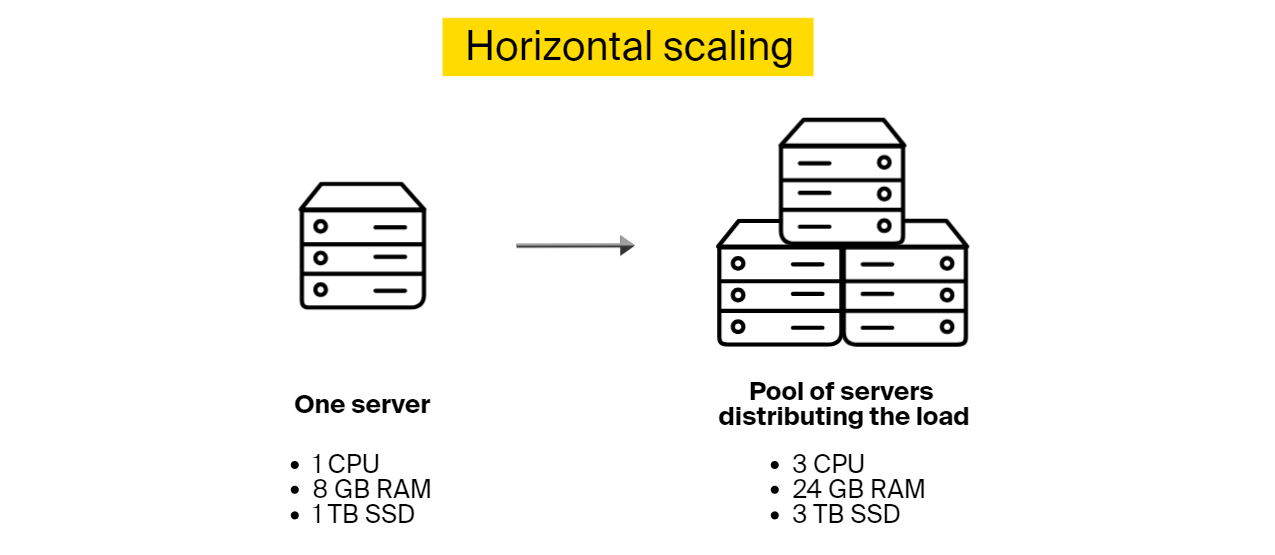
You can scale software horizontally by incorporating additional nodes into the system to handle a higher load, as it will be distributed across the machines. For instance, if an application starts experiencing delays, you can scale out by adding another server.
Horizontal scalability is a better choice when you can’t estimate how much load your application will need to handle in the future. It’s also a go-to option for software that needs to scale fast with no downtime.

Benefits:
- Resilience to failure. If one node fails, others will pick up the slack
- There is no downtime period during scaling as there is no need to deactivate existing nodes while adding new ones
- Theoretically, the possibilities to scale horizontally are unlimited
Limitations:
- Added complexity. You need to determine how the workload is distributed among the nodes. You can use Kubernetes for load management
- Higher costs. Adding new nodes costs more than upgrading existing ones
- The overall software speed might be restricted by the speed of node communication
Vertical software scalability (scaling up)
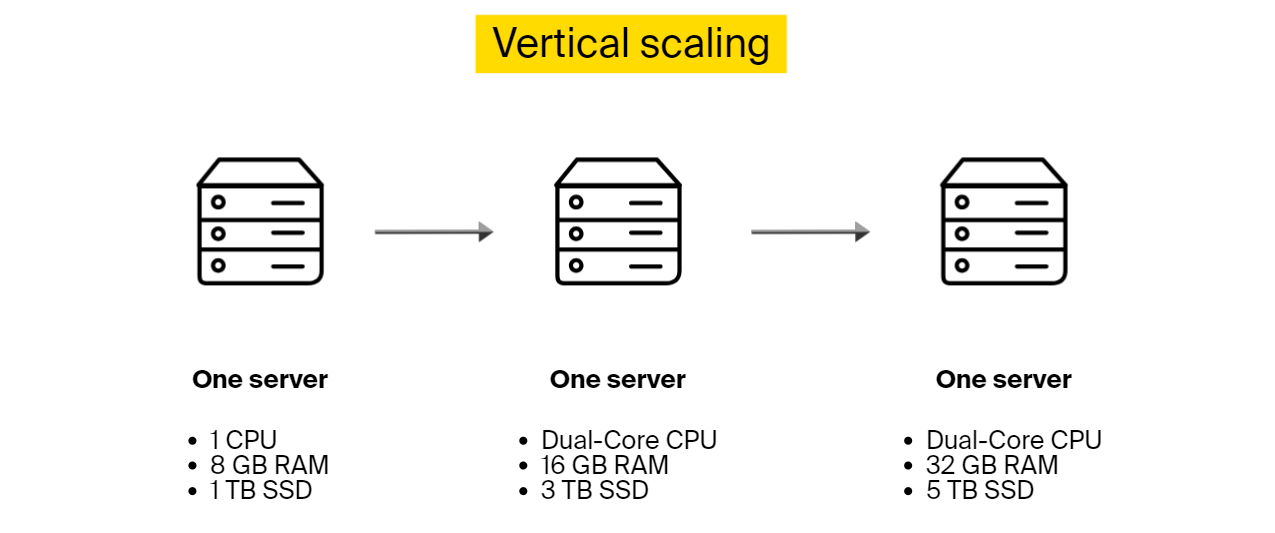
Vertical scalability is about adding more power to the existing hardware. If with horizontal scalability you would add another server to handle an application’s load, here you will update the existing server by adding more processing power, memory, etc. Another option is removing the old server and connecting a more advanced and capable one instead.
This scalability type works well when you know the amount of extra load that you need to incorporate.

Benefits:
- There is no need to change the configuration or an application’s logic to adapt to the updated infrastructure
- Lower expenses, as it costs less to upgrade than to add another machine
Limitations:
- There is downtime during the upgrading process
- The upgraded machine still presents a single point of failure
- There is a limit on how much you can upgrade one device
Vertical vs. horizontal scalability of software


When do you absolutely need scalability?
Many companies sideline scalability in software engineering in favor of lower costs and shorter software development lifecycles. And even though there are a few cases where scalability is not an essential system quality attribute, in most situations, you need to consider it from the early stages of your product life cycle.
When software scalability is not needed:
- If the software is a proof of concept (PoC) or a prototype
- When developing internal software for small companies used only by employees
- Mobile/desktop app without a back end
For the rest, it’s strongly recommended to look into scalability options to be ready when the time comes. And how do you know it’s time to scale? When you notice performance degradation. Here are some indications:
- Application response time increases
- Inability to handle concurrent user requests
- Increased error rates, such as connection failures and timeouts
- Bottlenecks are forming frequently. You can’t access the database, authentication fails, etc.
Tips for building highly scalable software
Software scalability is much cheaper and easier to implement if considered at the very beginning of software development. If you have to scale unexpectedly without taking the necessary steps during implementation, the process will consume much more time and resources. One such approach is to refactor the code, which is a duplicate effort, as it doesn’t add any new features. It simply does what should have been done during development.
Below you can find eight tips that will help you build software that is easier to scale in the future. The table below divides the tips into different software development stages.


Tip #1: Opt for hosting in the cloud for better software scalability
You have two options to host your applications, either in the cloud or on premises. Or you can use a hybrid approach.
If you opt for the on-premises model, you will rely on your own infrastructure to run applications, accommodate your data storage, etc. This setup will limit your ability to scale and make it more expensive. However, if you operate in a heavily regulated sector, you might not have a choice, as on-premises hosting gives you more control over the data.
Also, in some sectors, such as banking, transaction handling time is of the essence and you can’t afford to wait for the cloud to respond or tolerate any downtime from cloud providers. Companies operating in these industries are restricted to using specific hardware and can’t rely on whatever cloud providers offer. The same goes for time-sensitive, mission-critical applications, like automated vehicles.
Choosing cloud computing services will give you the possibility to access third-party resources instead of using your infrastructure. With the cloud, you have an almost unlimited possibility to scale up and down without having to invest in servers and other hardware. Cloud vendors are also responsible for maintaining and securing the infrastructure.
If you are working in the healthcare industry, you can check out our article on cloud computing in the medical sector.
Tip #2: Use load balancing
If you decide to scale horizontally, you will need to deploy load-balancing software to distribute incoming requests among all devices capable of handling them and make sure no server is overwhelmed. If one server goes down, a load balancer will redirect the server’s traffic to other online machines that can handle these requests.
When a new node is connected, it will automatically become a part of the setup and will start receiving requests too.
Tip #3: Cache as much as you can
Cache is used to store static content and pre-calculated results that users can access without the need to go through calculations again.
Cache as much data as you can to take the load off your database. Configure your processing logic in a way that data which is rarely altered but read rather often can be retrieved from a distributed cache. This will be faster and less expensive than querying the database with every simple request. Also, when something is not in the cache but is accessed often, your application will retrieve it and cache the results.
This brings issues, such as, how often should you invalidate the cache, how many times a piece of data needs to be accessed to be copied to the cache, etc.
Tip #4: Enable access through APIs
End users will access your software through a variety of clients, and it will be more convenient to offer an application programming interface (API) that everyone can use to connect. An API is like an intermediary that allows two applications to talk. Make sure that you account for different client types, including smartphones, desktop apps, etc.
Keep in mind that APIs can expose you to security vulnerabilities. Try to address this before it’s too late. You can use secure gateways, strong authentication, encryption methods, and more.
Tip #5: Benefit from asynchronous processing
An asynchronous process is a process that can execute tasks in the background. The client doesn’t need to wait for the results and can start working on something else. This technique enables software scalability as it allows applications to run more threads, enabling nodes to be more scalable and handle more load. And if a time-consuming task comes in, it will not block the execution threat, and the application will still be able to handle other tasks simultaneously.
Asynchronous processing is also about spreading processes into steps when there is no need to wait for one step to be completed before starting the next one if this is not critical for the system. This setup allows distributing one process over multiple execution threads, which also facilitates scalability.
Asynchronous processing is achieved at the code and infrastructure level, while asynchronous request handling is code level.
Tip #6: Opt for database types that are easier to scale, when possible
Some databases are easier to scale than others. For instance, NoSQL databases, such as MongoDB, are more scalable than SQL. The aforementioned MongoDB is open source, and it’s typically used for real-time big data analysis. Other NoSQL options are Amazon DynamoDB and Google Bigtable.
SQL performs well when it comes to scaling read operations, but it stalls on write operations due to its conformity to ACID principles (atomicity, consistency, isolation, and durability). So, if these principles aren’t the main concern, you can opt for NoSQL for easier scaling. If you need to rely on relational databases, for consistency or any other matter, it’s still possible to scale using sharding and other techniques.
Tip #7: Choose microservices over monolith architecture, if applicable
Monolithic architecture
Monolithic software is built as a single unit combining client-side and server-side operations, a database, etc. Everything is tightly coupled and has a single code base for all its functionality. You can’t just update one part without impacting the rest of the application.
It’s possible to scale monolith software, but it has to be scaled holistically using the vertical scaling approach, which is expensive and inefficient. If you want to upgrade a specific part, there is no escape from rebuilding and redeploying the entire application. So, opt for a monolithic if your solution is not complex and will only be used by a limited number of people.
Microservices architecture
Microservices are more flexible than monoliths. Applications designed in this style consist of many components that work together but are deployed independently. Every component offers a specific functionality. Services constituting one application can have different tech stacks and access different databases. For example, an eCommerce app built as microservices will have one service for product search, another for user profiles, yet another for order handling, and so on.
Microservice application components can be scaled independently without taxing the entire software. So, if you are looking for a scalable solution, microservices are your go-to design. High software scalability is just one of the many advantages you can gain from this architecture. For more information, check out our article on the benefits of microservices.
Tip #8: Monitor performance to determine when to scale
After deployment, you can monitor your software to catch early signs of performance degradation that can be resolved by scaling. This gives you an opportunity to react before the problem escalates. For instance, when you notice that memory is running low or that messages are waiting to be processed longer than the specified limit, this is an indication that your software is running at its capacity.
To be able to identify these and other software scalability-related issues, you need to embed a telemetry monitoring system into your application during the coding phase. This system will enable you to track:
- Average response time
- Throughput, which is the number of requests processed at a given time
- The number of concurrent users
- Database performance metrics, such as query response time
- Resource utilization, such as CPU, memory usage, GPU
- Error rates
- Cost per user
You can benefit from existing monitoring solutions and log aggregation frameworks, such as Splunk. If your software is running in the cloud, you can use the cloud vendor’s solution. For example, Amazon offers AWS CloudWatch for this purpose.
Examples of scalable software solutions from ITRex portfolio
Smart fitness mirror with a personal coach
Project description
The client wanted to build a full-length wall fitness mirror that would assist users with their workout routine. It could monitor user form during exercise, count the reps, and more. This system was supposed to include software that allows trainers to create and upload videos, and users to record and manage their workouts.
What we did to ensure the scalability of the software
- We opted for microservices architecture
- Implemented horizontal scalability for load distribution. A new node was added whenever there was too much load on the existing ones. So, whenever CPU usage was exceeding 90% of its capacity and staying there for a specified period of time, a new node would be added to ease the load.
- We had to deploy relational databases – i.e., SQL and PostgreSQL – for architectural reasons. Even though relational databases are harder to scale, there are still several options. In the beginning, as the user base was still relatively small, we opted for vertical scaling. If the audience grew larger, we were planning on deploying the master-slave approach – distributing the data across several databases.
- Extensively benefited from caching as this system contains lots of static information, such as trainers’ names, workout titles, etc.
- Used RestAPI for asynchronous request processing between the workout app and the server
- Relied on serverless architecture, such as AWS Lambda, for other types of asynchronous processing. One example is asynchronous video processing. After a trainer loads a new workout video and segments it into different exercises, they press “save,” and the server starts processing this video for HTTP live streaming to construct four versions of the original video with different resolutions. The trainer can upload new videos simultaneously.
- In another example, the system asynchronously performs smart trimming on user videos to remove any parts where the user was inactive.
Biometrics-based cybersecurity system
Project description
The client wanted to build a cybersecurity platform that enables businesses to authenticate employees, contractors, and other users based on biometrics, and steer clear of passwords and PINs. This platform also would contain a live video tool to remotely confirm user identity.
How we ensured this software was scalable
- We used a decentralized microservices architecture
- Deployed three load balancers to distribute the load among different microservices
- Some parts of this platform were autoscalable by design. If the load surpassed a certain threshold, a new instance of a microservice was automatically created
- We used six different databases – four PostgreSQLs and two MongoDBs. The PostgreSQL databases were scaled vertically when needed. While designing the architecture, we realized that some of the databases would have to be scaled rather often, so we adopted MongoDB for that purpose, as they are easier to scale horizontally.
- Deployed asynchronous processing for better user experience. For instance, video post-processing was done asynchronously.
- We opted for a third-party service provider’s facial recognition algorithm. So, we made sure to select a solution that was already scalable and incorporated it into our platform through an API.
Challenges you might encounter while scaling
If you intend to plan for software scalability during application development and want to incorporate the tips above, you can still face the following challenges:
- Accumulated technical debt. Project stakeholders might still attempt to sideline scalability in favor of lower costs, speed, etc. Scalability is not a functional requirement and can be overshadowed by more tangible characteristics. As a result, the application will accumulate technical features that will not be compatible with scalability.
- Scaling with Agile development methodology. Agile methodology is all about embracing change. However, when the client wants to implement too many changes too often, software scalability can be put aside for the sake of accommodating changing demands.
- Scalability testing. It’s hard to perform realistic load testing. Let’s say you want to test how the system will behave if you increase the database size 10 times. You will need to generate a large amount of realistic data, which matches your original data characteristics, and then generate a realistic workload for both writes and reads.
- Scalability of third-party services. Make sure that your third-party service provider doesn’t limit scalability. When selecting a tech vendor, verify that they can support the intended level of software scalability, and integrate their solution correctly.
- Understanding your application’s usage. You need to have a solid view of how your software will work and how many people will use it, which is rarely possible to estimate precisely.
- Architectural restrictions. Sometimes you are limited in your architectural choices. For example, you might need to use a relational database and will have to deal with scaling it both horizontally and vertically.
- Having the right talent. In order to design a scalable solution that will not give you a headache in the future, you need an experienced architect who worked on similar projects before and who understands software scalability from both coding and infrastructure perspectives. Here at ITRex Group, we’ve worked on many projects and always keep scalability in mind during software development.
To sum up
Unless you are absolutely positive that you will not need to scale, consider software scalability at early stages of development and take the necessary precautions. Even if you are limited in your architectural choices and can’t always implement the most scalable option, you will still know where the obstacles are and will have time to consider alternatives.
Leaving scalability out for the sake of other functional requirements will backfire. First, the company will struggle with performance degradation. It will take too long to process requests. Users will experience unacceptable delays. After all this, the company will scale paying double and triple the amount that could’ve been spent at earlier stages.
Considering deploying new enterprise software or updating an existing system, but worried it won’t keep up with rapidly expanding business needs? Get in touch! We will make sure your software not only has all the required functionality but also can be scaled with minimal investment and downtime.