


Cloud databases are an increasingly popular option to deploy database engines. Many consider cloud databases as a way to save on their database maintenance costs. But before migrating your database, you should familiarize yourself with the pricing model of common cloud database services. Cloud pricing can be complex and subject to unpredictable fluctuations. You should carefully consider your use case, the cloud service you plan to use, and its expected monthly cost, before making the move.
In this article I’ll cover leading cloud database solutions, explain their pricing model, and provide examples of pricing for common scenarios.
What Is a Cloud Database?
The common definition of a cloud database is any database that runs in the cloud, although it usually refers to a database-as-a-service (DBaaS). It differs from on-premise databases because it does not require organizations to maintain physical infrastructure. Rather, they can use virtual infrastructure or access the database as a service from a cloud computing provider.
Cloud databases typically come in one of two deployment models:
- Virtual machine (VM) modelthe user runs the database independently in the cloud, using a VM image.
- DBaaSthe user purchases access to the database service, which the cloud database provider maintains.
Cloud databases may use a NoSQL or SQL-based data model. Cloud database services provide high availability and scalability, allowing organizations to grow and evolve easily. The underlying software stack of a database service should be transparent, allowing the user to observe issues.
What are the Common Cloud Database Services?
Here are a few of the most popular cloud database services offered by major cloud providers:
- Amazon Relational Database Service (RDS)lets you run a managed version of popular database engines, including MySQL, PostgreSQL, MariaDB, MS SQL Server, and Oracle.
- Azure SQL Databasethis is Microsofts managed version of the SQL Server database. It has a large number of deployment options, letting you deploy a standalone managed instance, a scalable database pool, and more.
- Google Cloud SQLsimilar to RDS, this lets you run popular database engines on Google Cloud infrastructure. Currently it supports only MySQL, PostgreSQL, and SQL Server.
In the following sections, I’ll dive deeper into the pricing model of each of these cloud database services.
Azure SQL Database Pricing
Azure SQL Database is a DBaaS offering from Microsoft Azure that lets organizations implement SQL databases without installing hardware or software. One of the main benefits of the Azure cloud is its strong cloud security capabilities, which are important for mission critical database deployments.
The Azure SQL Database service has multiple deployment options, as I’ll explain below, creating many opportunities for Azure cost optimization. There are two purchasing options:
- vCore-basedpriced according to virtual cores.
- DTU-basedpriced according to database transaction units (DTUs).
The vCore-based pricing model is preferable for most organizations because it lets them select storage and compute resources independently. The DTU-based pricing model offers prepackaged storage, compute, and I/O resources.
The vCore model calculates pricing based on:
- Compute resourcesincluding the service tier, the number of vCores, memory, and hardware generation.
- Log and data storageincluding the amount and type of data.
- Backup storageincluding zone redundant storage (ZRS), locally redundant storage (LRS), and geographically redundant storage locations with read access (RA-GRS).
With the vCore model, organizations can use Azure Hybrid Benefit for SQL Server or prepaid reserved capacity. These options can help save money and are unavailable in the DTU-based model.
Azure SQL Database customers can select the service tier for availability and performance. The vCore model offers three service tiers:
- General-purposesupports most business workloads with balanced, scalable, and budget-oriented storage and compute options. This tier is a good place to start.
- Business-criticaluseful for business-critical applications that require low latency and high resilience. It uses multiple isolated replicas to ensure business continuity in case of failure. This tier can achieve high performance with In-Memory OLTP.
- Hyperscalesupports highly scalable business workloads with over 100TB storage. This tier is the middle ground in terms of cost and performance and cost perspective and is currently only available for single databases.
The general-purpose service tier in the vCore-based pricing model offers two compute tiers that determine how customers pay for computing:
- Provisioned computesuitable for consistent usage patterns with high, long-term compute utilization and for multiple databases using elastic pools. This tier provides a fixed amount of computing resources to ensure consistent performance over time. The customer pays for these resources in advance, regardless of usage. Organizations choosing this option must plan thoroughly to accommodate their workloads.
- Serverless computesuitable for intermittent or unpredictable usage patterns with low compute utilization on average. This tier automatically scales compute, simplifying performance management and charging only for the compute the customer uses. It enables organizations to further optimize costs by automatically pausing and resuming workloads. During a pause, the customer only pays for storage.
The following table shows pricing for Azure SQL Database, with the following service options:
- General Purpose service tier
- vCore pricing model
- Standard Series (Gen5) hardware
- West US 2 Region

AWS RDS Pricing
Amazon Relational Database Service (RDS) is an Amazon Web Services (AWS) managed SQL database service. Amazon RDS supports the following database engines: MySQL, Aurora, Oracle, Microsoft SQL Server, PostgreSQL, and Maria DB. It assists with relational database management tasks like data migration, backup, recovery, and patching.
Amazon RDS deploys and maintains relational databases in the cloud. Cloud administrators can use Amazon RDS to set up, operate, manage, and scale a relational instance of a cloud database. It is a service for managing relational databases, not a database.
You can try Amazon RDS for free’use it with no minimum fees and only pay for what you use. You can pay for Amazon RDS with on-demand instances (which you can start and stop on demand) or reserved instances (which require a long term commitment of 1 or 3 years). Amazon RDS provides a selection of instance use case types optimized for relational databases.
Amazon RDS helps new AWS customers start with a free managed database service in the cloud. AWS Free Tier gives users the following allowance each month:
- 750 hours of Amazon RDS Single-AZ db.t3.micro Instance usage running MySQL, MariaDB, PostgreSQL, Oracle BYOL, or SQL Server (running SQL Server Express Edition).
- 20 GB of General Purpose (SSD)for database storage.
- 20 GB of storagefor automated database backup and any user-initiated database snapshots.
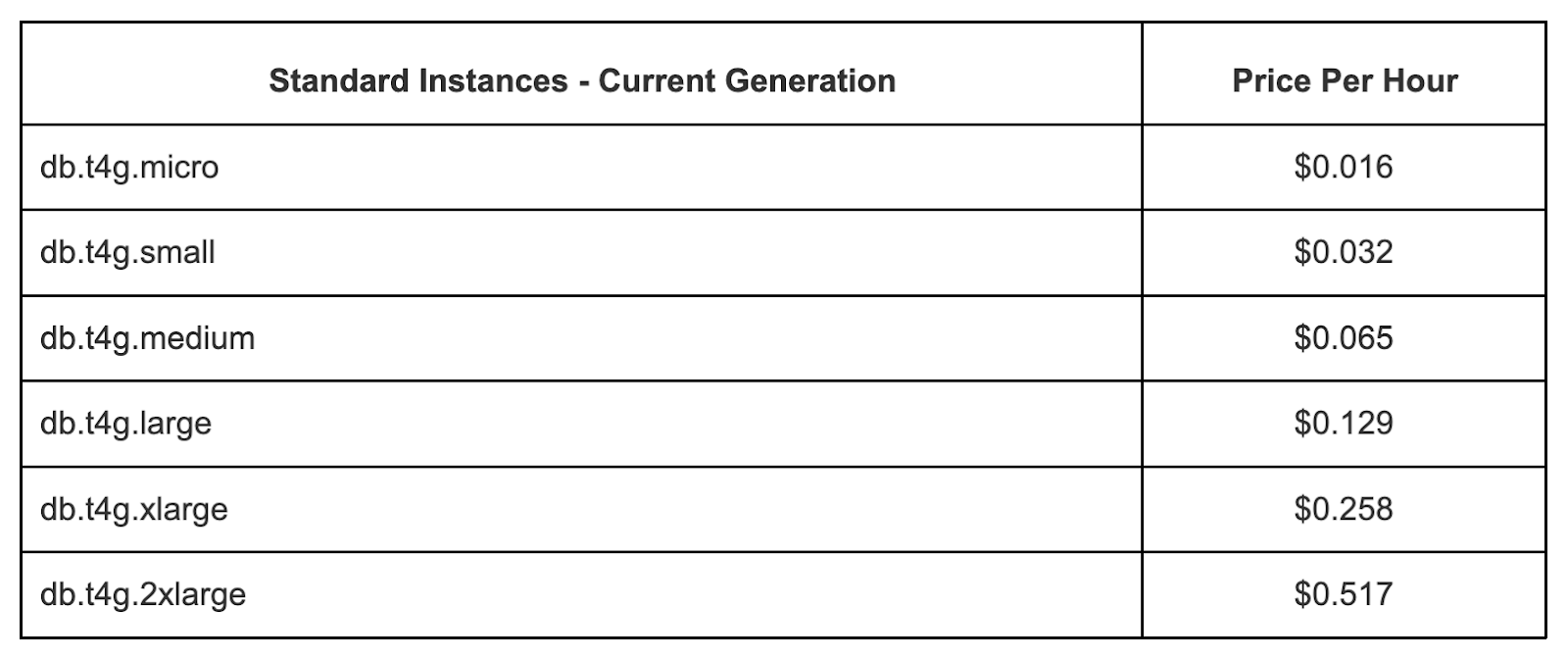
The following table shows the standard pricing per hour for MySQL in Amazon RDS. Pricing for other database engines is similar, note that for commercial databases, if you don’t have your own license, the price is higher to reflect license cost.
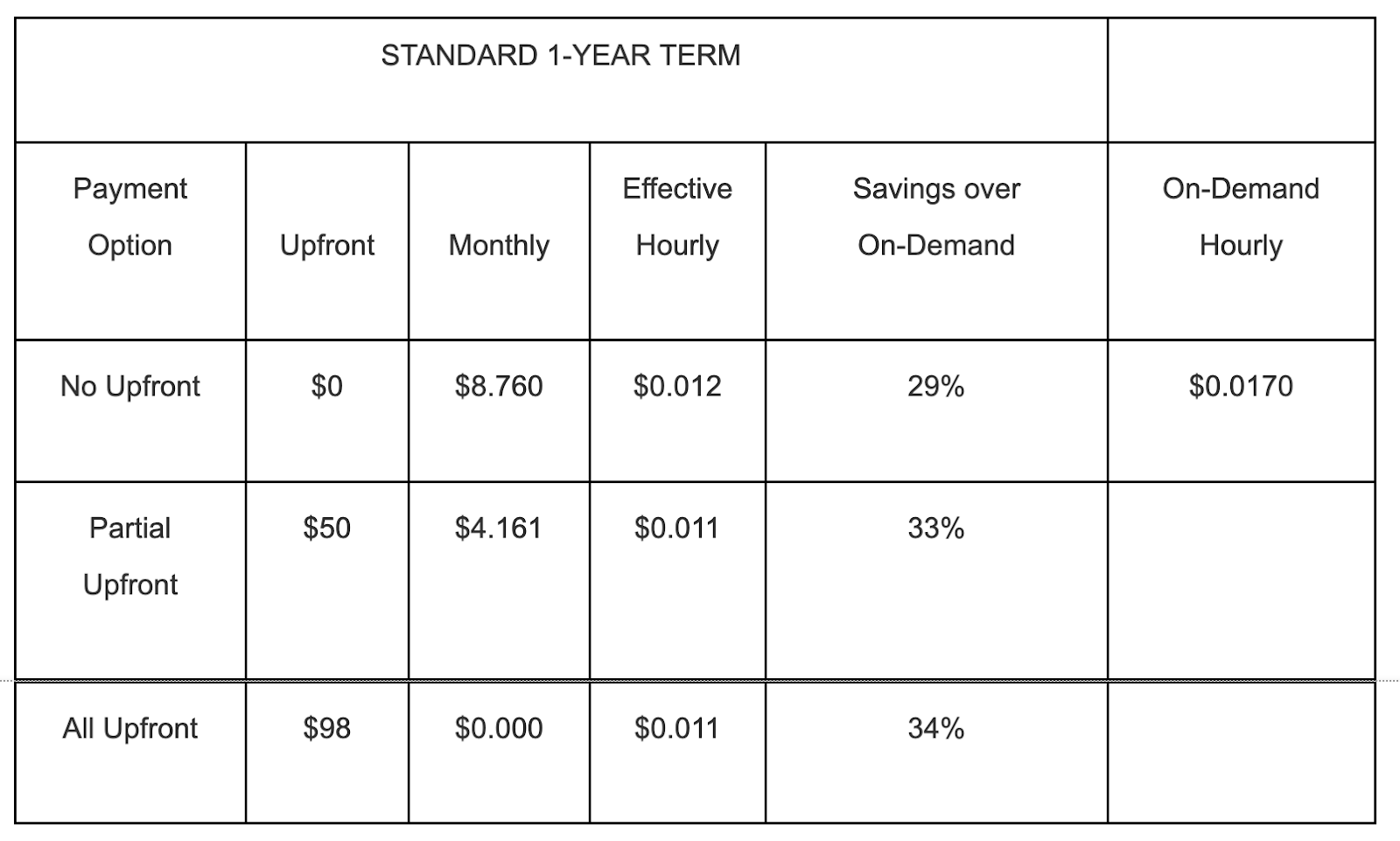
The following table shows MySQL pricing with Reserved Instances, if you commit to a 1-year term. These prices are significantly discounted.
The following table shows RDS storage costs, based on the type of storage you select’SSD, provisioned IOPS for high performance use cases, or slower magnetic storage.

Google Cloud SQL Pricing
Google Cloud SQL is a fully-managed relational database service that lets customers set up and manage their databases on the Google Cloud Platform.
The instance type determines the pricing model for Google Cloud SQL (i.e., MySQL, PostgreSQL, or SQL Server).
Google Cloud SQL charges for the following elements:
- Memory and CPUwith dedicated-core instances, the customer chooses how much memory and how many CPUs they want (up to 624 GB memory and 96 CPUs). Memory and CPU pricing differs depending on the region of the instance. Stand-alone instances cost the same as read and failover replicas.
- Networking and storagenetworking and storage prices depend on the instance’s region. Google charges for network traffic from Cloud SQL instances based on the destination and the involvement of partners (if relevant). Network traffic from a Cloud SQL instance to a third-party (non-Google) client is called Internet egress (for example, reading Cloud SQL data on a local server).
- Instancesinstance pricing only applies to shared-core instances. With dedicated-core instances, customers pay for the amount of memory and the number of cores they use. When instance pricing applies, seconds are the time unit for measuring usage. Google charges for instances per second of runtime (with the activation policy set to ALWAYS), culminating in full billable minutes.
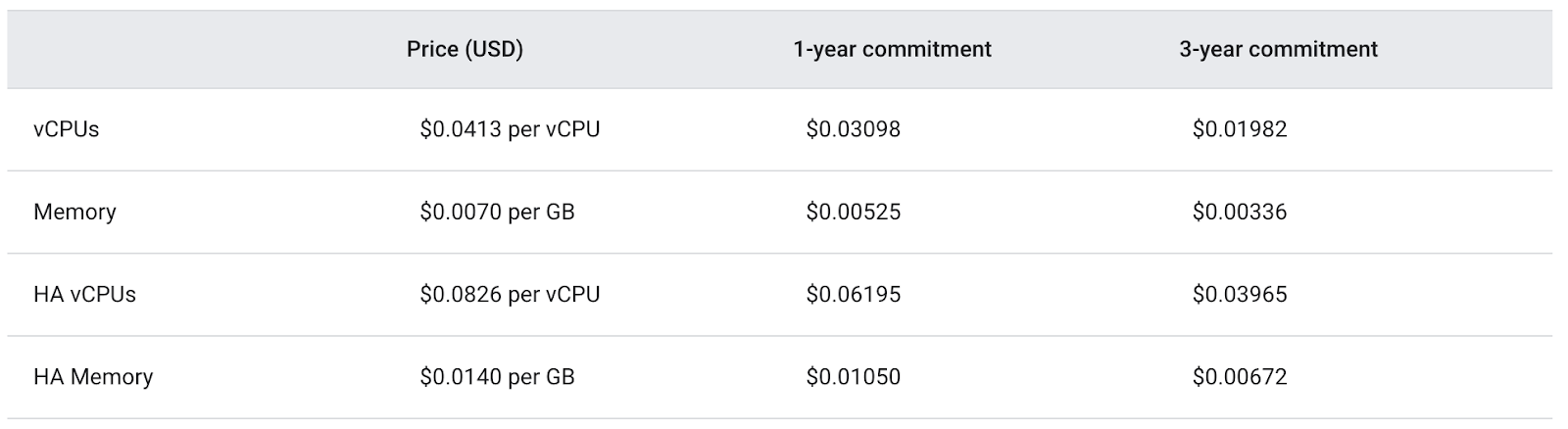
The following table shows pricing for MySQL and PostgreSQL databases, in the Iowa Region.
Conclusion
In this article, I explained the basics of cloud databases, covered three popular database servicesAmazon RDS, Azure SQL Database, and Google Cloud SQL, and explained their pricing models. I hope this will be useful as you plan your cloud database journey.
