


In September of 2017, Apple officially introduced ARKit “ its own framework for creating augmented reality (AR) experiences.
The potential behind AR is difficult to underestimate. A report by Digi-Capital states that the augmented and virtual reality markets are likely to reach a total of $108 billion by 2021 with mobile AR‘s share being $83 billion compared to VR’s share of $25 billion. Let those number sinks in…
ARKit is expected to help Apple take the majority of the mobile AR apps market’s stake. Yet, most people know very little about Apple’s AR framework and have no idea what new opportunities it provides.
So, let’s find out!
What is Apple’s ARKit?
First of all, you should understand what ARKit is and which tools you will need to start using it. ARKit is a framework that allows you to integrate sensors (a camera, accelerometer, and gyroscope) with your mobile application to add 2D or 3D elements to your iPhone’s or iPad’s live view.
In other words, ARKit helps you blend virtual objects or information with the real environment around you. To start using ARKit, you need two components:
-
Xcode 9 editor. It’s the latest version of Apple’s code editor which allows you to create applications for all Apple platforms. Be it an app for macOS, iOS, watchOS, or tvOS, Xcode is a universal tool for developers. Xcode 9 contains the iOS 11 SDK, which means you can’t use ARKit if you have an earlier version of the editor.
-
An iPhone or iPad with iOS 11. ARKit is supported by iOS 11 only, so it’s impossible to use Apple’s AR framework if a device runs on an earlier iOS version.
What Opportunities Does ARKit Provide?
Now that you know essential information about Apple’s augmented reality framework, you might be asking whether there’s anything special about it. In fact, there are multiple other AR SDKs that can help developers create augmented reality experiences.
So, let’s find out what unique opportunities Apple’s ARKit provides.
It Develops Apps for Millions of Potential Users
As we’ve already mentioned, iOS 11 contains ARKit which means millions of people can install mobile AR apps on their Apple devices. That’s a huge market with a gigantic target audience!
It’s important to note, however, that iOS 11 isn’t the only prerequisite for ARKit, as the framework runs only on A9, A10, and A11 (the latest) processors in Apple devices. So, if a gadget runs on iOS 11 and has one of these chips, it will definitely support mobile AR apps created with ARKit.
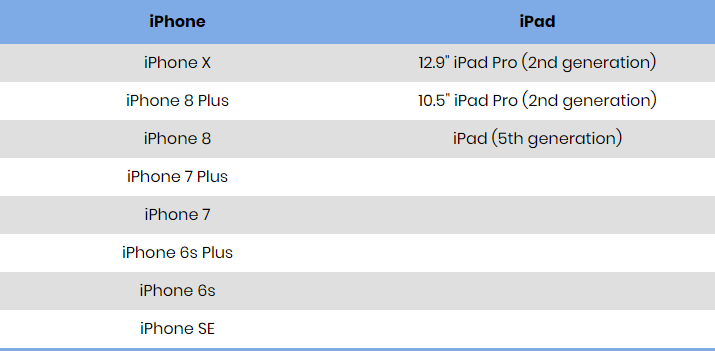
Here’s a list of Apple devices that support ARKit:
Ensure Your AR Apps’ Smooth Performance
Since ARKit is built into iOS 11, developers can create mobile augmented reality applications that run smoothly as there’s no need to add a layer for image processing. That’s an advantage of apps created with ARKit versus similar applications built with other AR SDKs.
High performance is particularly important for augmented reality apps as users need to have a feeling of reality.
Create Realistic AR Experiences
Would you like to use an app with poor graphics? That is not likely.
That’s why developers should use the most technologically advanced tools to build augmented reality applications. ARKit has many features to be proud of, so let’s mention the most important ones.
-
Firstly, ARKit uses an advanced technology called Visual Inertial Odometry (VIO) to track the surrounding environment. VIO uses the iPhone’s (or iPad’s) camera and motion sensors, so Apple devices can accurately sense how they move and render virtual objects accordingly.
-
Next, ARKit can analyse the scene and detect horizontal planes (such as floors or tables). Once a plane is found, virtual objects are placed on it.
-
Finally, ARKit ensures a high-quality lighting adjustment. Apple’s AR framework uses the camera to estimate the amount of light and adjusts the lighting of virtual objects.
Thanks to these technologies, Apple’s AR framework allows developers to create realistic augmented reality apps that truly engage users.
Build Top-Quality Graphics with Third-Party Tools
Apart from offering a number of cool technologies, ARKit allows you to go the extra mile and use the power of third-party tools to deliver the highest-quality graphics in your mobile AR apps.
-
Unity. The Unity ARKit plugin gives access to ARKit’s features (we’ve mentioned them in the previous section) as well as additional Unity functionalities.
-
Unreal Engine. The augmented reality plugin for Unreal Engine 4 allows you to apply the potential of one of the world’s leading game engines to your mobile AR apps.
Add Face Tracking to Your AR Apps
So far, this functionality is only available on the iPhone X, but it’s a revolutionary innovation in the AR industry. As you probably, know, the iPhone X boasts accurate and real-time face tracking “ the sensors on the iPhone X can detect the position and expression of a user’s face.
ARKit can use this functionality to create unparalleled AR experiences. You can build stunning mobile AR apps and apply face tracking to virtual objects. So far, iPhone X owners can create and share custom animated emojis (also called animojis), but face tracking with ARKit allows you to build your own unique experiences with mobile AR apps.
Conclusion
Now that Apple has officially released iOS 11 and ARKit, you can start using this framework to create exciting mobile AR applications. ARKit is easy-to-use and you can try building your first AR app by checking out this step-by-step guide.
