What Is Azure Cost Optimization?
Cost optimization is a strategy that adjusts computing infrastructure to minimize cloud spending-in other words, matching the cost to the actual requirements. For example, a company may discover that the Azure VMs hosting its web applications are not fully utilized. In response, they can reduce the scale of the VMs to avoid paying for unused capacity.
Azure is a cloud computing platform with services based on virtualized infrastructure and the global Microsoft network. It offers businesses granular control over cloud resource deployments. As a cloud hosting platform, it differs from more rigid environments that require businesses to predict resource usage or deploy redundant infrastructure to support spikes in demand.
Azure offers various services tailored to specific use cases, making it much more flexible than traditional server-based hosting. However, this level of complexity and flexibility has its downsides.
To effectively optimize their Azure costs, customers must manage their resource consumption to match business needs accurately. It can be challenging to do so without strong knowledge of the Azure platform and its various pricing models. It is also important to understand how to monitor performance comprehensively and respond by changing organizational processes to enable optimization.
Azure Cost Optimization Best Practices
Here are some best practices to help you perform cost analysis in Azure:
Calculate the Cost of Your Azure Deployment
Evaluate the cost of the solution before deploying your infrastructure. Assessments help organizations prepare a workload budget in advance. This budget is useful for measuring the accuracy of the first cost estimate over time compared to the actual cost of the solution after deployment.
Azure offers tools to help calculate the cloud costs:
- Pricing Calculator-a tool that provides cost estimates for different possible Azure service combinations. There are various ways to implement a solution in Azure, and each combination affects the overall spending. It is important to consider all the infrastructure requirements of the cloud deployment early to increase the accuracy of the cost estimates. The more data the tool has, the more reliably it can estimate the projected costs of the Azure solution.
- Azure Migrate-a service for assessing an organization’s existing on-premise workloads and provides insights into the possible requirements of an alternative Azure solution. It starts by analyzing the local computer to see if migration is possible. Next, it provides VM sizing recommendations for maximum performance in Azure. Lastly, it generates an estimated cost for the Azure solution.
Leverage Cost Analysis Tools
Organizations use cost analysis to understand their costs in depth by splitting and assessing costs based on resource attributes. The following considerations are a good starting point for cost analysis-periodically addressing them provides the information needed to make accurate cost-related decisions:
Current estimated monthly expenses-how much has the company spent this month? Is it within the budget?
- Anomaly investigation-regularly check that costs are within reasonable limits for normal use. What are the usage trends? Are there anomalies?
- Invoice verification-is the latest invoice higher than the previous one? How have spending habits changed each month?
- Charge analysis-once the bill has arrived, it is important to understand its breakdown by classifying the charges.
Facilitate Remote Work to Boost Productivity
Windows Virtual Desktop lets organizations quickly launch and scale virtual desktops, giving users access to work desktops and applications from anywhere. There is no need to configure new hardware. Windows Virtual Desktop provides the best Office 365 and Windows 10 virtual desktop experience with multi-session support. Companies can save money by paying only for the necessary infrastructure and turning off unused machines.
Aside from virtual desktops, employees must also access on-premises and cloud-based resources. Azure allows companies to quickly scale their on-prem virtual private network (VPN) using Azure VPN Gateway. It is possible to configure the solution to expand and shrink easily. Azure’s network can withstand rapid shifts in resource utilization, making it easy to manage spikes in utilization.
Optimize the Costs of Azure SQL Database
When building an SQL database in Azure, choosing a server and determining the performance tier are important. These tiers provide different levels of performance expressed in virtual cores (vCores) or database transaction units (DTUs).
Optimizing for a stable database load is easy by choosing a tier size that matches its performance requirements. However, some databases have unpredictable bursts of activity. Using an elastic pool can save money if the workloads are unpredictable.
Elastic pools in Azure SQL Database are a cost-effective way to manage and scale multiple databases with varied and unpredictable usage requirements. Databases in an elastic pool reside on a single SQL Database server and share a fixed number of resources at a fixed price. Pools are suitable for large numbers of databases with specific usage patterns. This pattern has low average and relatively low peak utilization for some databases.
The more databases added to an elastic pool, the more cost-effective they become. Elastic pools spread the usage costs across several databases, which can significantly impact the overall Azure database costs.
Prepay with Azure Reservations
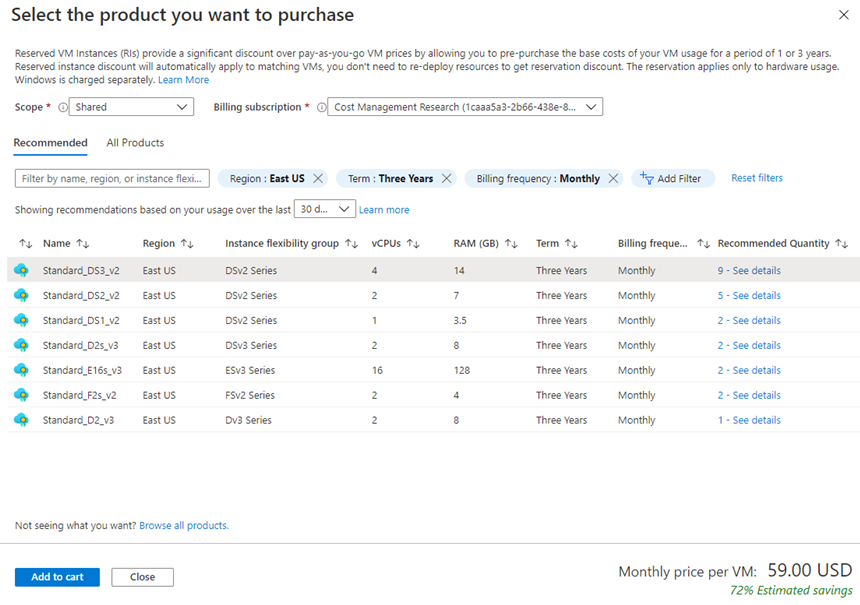
Azure Reservations offer some Azure services at discounted prices. They can save up to 72% compared to a pay-as-you-go pricing model. Companies can book services and resources in advance to receive a discount.
For example, organizations can pay upfront for one or three years of Azure resources like VM usage, database throughput, and database compute power. Here is an example showing the estimated savings for VMs. In this scenario, the organization would save about 72% by committing to three years.

Image Source: Azure
Customers with a pay-as-you-go subscription or an enterprise agreement can use Azure Reservations.
Leverage Spot VMs for Low-Priority Workloads
Spot instances allow customers to leverage Azure’s unused computing capacity and achieve significant savings. However, Azure ejects spot VMs whenever it needs to restore the capacity. Spot instances are ideal for non-critical workloads that can tolerate disruptions, such as batch jobs, dev/test environments, or large compute workloads
Conclusion
In this article, I explained the basics of Azure cost optimization and provided several techniques you can use to reduce your Azure costs:
- Calculate the cost of your Azure deployment using cost calculator tools
- Leverage cost analysis tools to identify waste and opportunities in existing deployments
- Facilitate remote work to reduce the number of machines required
- Optimize the costs of Azure SQL Database
- Prepay with Azure Reservations to gain discounts for long-running workloads
- Leverage Spot VMs for low-priority or fault tolerant workloads
I hope this will be useful as you improve the cost efficiency of your Azure workloads.