


Tableau is an older data software company that was founded in 2003. However, they continue to be one of the pioneers in big data advances. They have developed a number of software applications that can be excellent for uncovering the value of data within a company.
One of the great benefits of Tableau is its compatibility with other big data applications. You can learn more about using Tableau in conjunction with Jira below.
Discovering the Benefits of Tableau with Jira
Running large-scale projects that involve dozens of team members requires a lot from the managers. So, naturally, they turn to software like Jira for help.
And even though it was originally created as a platform for tracking bugs and errors in software and communicating them between testers/users and developers, it works quite well as a project management tool. It is also great for gathering data.
Tableau, on the other hand, is a piece of business intelligence software designed for gathering data and presenting it in an easier-to-understand, visual way.
I’m sure you understand the importance of putting raw data into a readable format. It makes it easier to gain further insight into your project, track your progress, identify your shortcomings, and come up with new strategies. Besides, analyzing data is vital to the success of any business, not just IT ones.
Connecting Jira to Tableau will help you improve the performance of your team, and this is not merely a bold statement. It’s a fact.
Let me elaborate on why that is, and how exactly it will do it.
Why Should You Connect Tableau and Jira?
Tableau Is Business Intelligence Software That Helps People See and Understand Their Data
It is rather straightforward. Business intelligence software helps break up raw data into graphs, charts, and other visual forms to make it easier to digest.
It helps get a clearer picture of the state of your project, or business as a whole.
Tableau is one of such software pieces and a rather user-friendly one at that.
Jira, on the Other Hand, Helps Collect That Data
Jira gives project managers access to a neat dashboard, where they can monitor vital information regarding their projects. More specifically, the tasks are given out to fellow team members, and their progress towards their completion, along with how long it took them.
This eases the manager’s jobs a bit and allows them to make necessary adjustments to the workflow in order to maximize efficiency.
How Would a Tableau Integration with Jira Benefit You?
Installing Tableau Connector for Jira will be useful for analysts and business intelligence professionals who work with data models in Tableau. But to use it you actually don’t need any kind of analytical background at all.
Even more so, it will come in handy for those of you who possess no (or little) Jira admin skills since it requires zero additional knowledge from you to start using it.
Jira is a vital data source for any business. By connecting it to Tableau you will be widening your data landscape and enabling yourself to merge all of your projects into a single view.
This, in turn, will help you make rational, timely decisions and focus on the tasks at hand.
How to Connect Tableau to Jira
The process is rather simple. Let me guide you through it step-by-step. You will need Jira Administration rights for this, but I’m sure you knew that already.
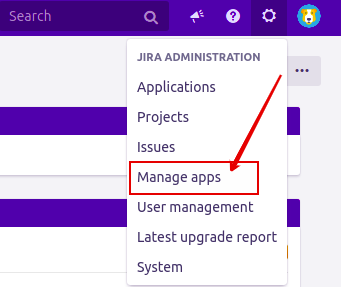
1. Go to the Jira Administration tab and click on Manage Apps.
2. Once redirected to the Find New Apps section, use the search field and type Tableau Connector For Jira Alpha Serve
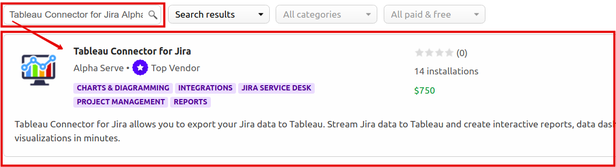
3. There, you will have the option of either getting a Free Trial or purchasing the application license.
From here on, all you have to do is follow the standard client installation path, while the application is automatically installed on your Jira instance.
You can also install it directly from the Atlassian Marketplace by going to the application’s product page.
How to Import Data from Jira into Tableau?
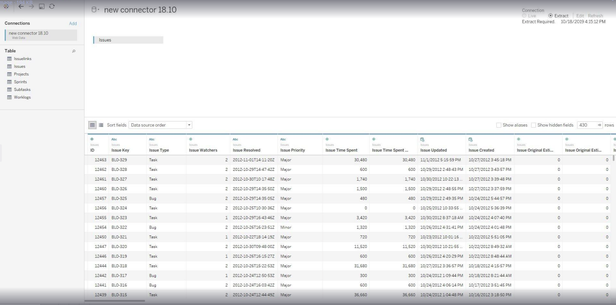
The Tableau Connector for Jira generates a data source URL to help you import data from Jira right to Tableau.
1. Copy the data source URL generated by the app.
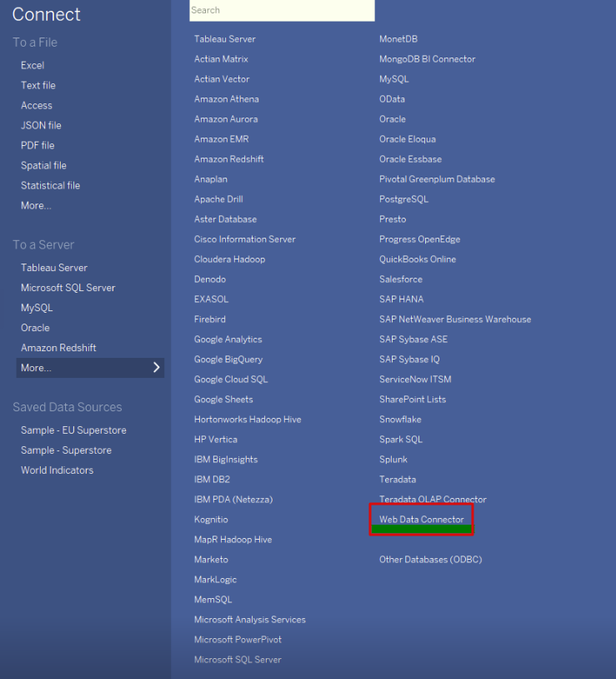
2. Launch Tableau desktop and go to the Web Data Connector.
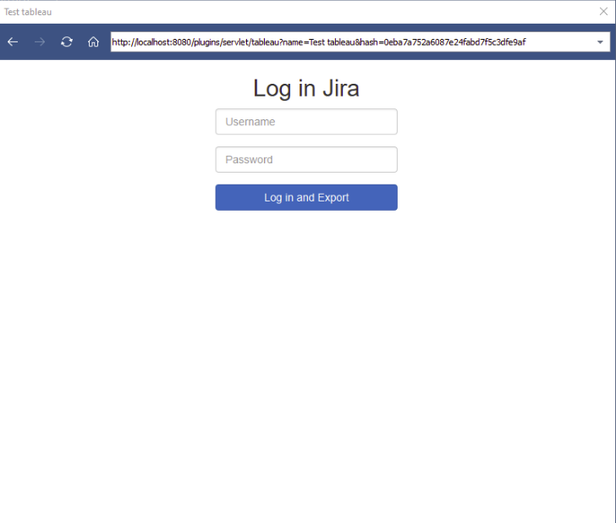
3. Paste the data source URL and hit Enter.
4. Enter your Jira credentials and click Log in and Export.
After this, your Jira data will be exported to Tableau. It can take a minute if you have a lot of it.
What Will You Be Able to Do After Integrating Tableau and Jira?
By now, you already know what business intelligence software is and why it is important for optimizing your team’s workflow. Okay, but how exactly? Let’s look at a few examples of applying both Tableau and Jira functionality to improve your strategies.
Overseeing Multiple Projects
If you’re considering using business intelligence software, your agency probably manages multiple tasks at the same time. And that’s exactly what Tableau allows you to do.
Bring everything in one place. All of your projects, progress on them, schedules, most time-consuming issues, and so on.
By collecting data and presenting it in an accessible manner, it helps identify goals and break them down into smaller tasks, which is great for staying ahead of the schedule.
By putting all of your projects into a single dashboard that tracks all of your key performance indicators, you’re making the managers’ jobs a lot easier and allow them to concentrate on only the most important pain points and optimize workflow as much as possible.
Dynamic Resource Management
Pushing creative developers against deadlines and making them follow strict schedules devised by managers isn’t exactly the most efficient way of inspiring creativity.
Of course, they are still going to do their job, but in their mind, they will be racing against the clock, feeling discouraged from improvising and taking a more creative approach to things.
Giving your devs more creative freedom will lead to them approaching each problem with their unique way of thinking, which is exactly what you need if you want a quality end-product.
And to give them that freedom, you can let them organize their own workflow rather than follow the manager’s guidelines.
Tableau makes doing that much easier.
Once again, by tracking each task and putting all of that information into a single dashboard that quickly informs everybody about the state of each project down to the tiniest individual tasks, business intelligence software takes a lot of weight off managers’ shoulders.
After all, all they need to do to check on any ongoing (or completed) task, is refer to that single dashboard.
With quick access to such information, the flexibility of your team increases, allowing for quick resource management, dedicating manpower to the most pressing issues at hand.
Jira Linked with Tableau Is Perfect for Monitoring Support Teams
Since it has been initially created as a tool for tracking software bugs, it is highly efficient for communication between user/tester and developer.
Once the data is collected by Jira, it is added to Tableau, which makes it easier to analyze and make a sense of.
This lets you track each ticket, what issue it is about, and how long it takes to resolve. Not only does it allow you to improve your software by eliminating said bugs, but also spot recurring issues and keep track of how well your support team is handling their job.
Wrapping Up
So, business intelligence software can have quite a considerable impact on your team’s effectiveness. Collecting and analyzing data is vital for getting a wider, clearer picture of the situation in your agency, down to the scale of individual tasks and support tickets.
Jira is an amazing tool for gathering data, and Tableau is perfect for organizing it in an easily-readable way. So, it makes perfect sense to integrate them between one another to enhance your ability to process that information, make timely decisions, and stay on top of your schedule.
Tableau combines all the relevant data from each of your projects into a single, intuitive dashboard that each team member can refer to, saving time and increasing productivity.
