Data security is a top concern for consumers, understandably. A recent study from IBM found that 75% of customers will not purchase from an online company if there are any doubts regarding their data‘s security. 85% of online shoppers agreed that companies need to do more to protect customer data, but only 20% felt that their information was truly safe.
Being a data-driven business is important in today’s market, but it can only be fueled by quality data sources about your audiences and the market. If customers are going to hand over their sensitive information or feel safe enough to interact with your site and provide personal data, they need to know that their data is in good hands. Here are five of the simplest ways to keep your online business secure and build this essential trust with your customers.
1. Focus on Security at Checkout
The checkout stage will cause the majority of your customers to question whether or not they want to share their data. If they have any worries about the security of your site, it could lead to abandonment. In fact, 15% of online shoppers will leave without a purchase due to concerns about payment security.
Be sure that the online store platform you use clearly states that it uses an SSL certificate for security and is PCI Compliant. An SSL certificate confirms to customers that their data will be safely encrypted to decrease the likelihood that it can be stolen. PCI Compliance is required by all online entities that process credit cards and it sets certain standards that e-commerce companies must follow to ensure their data security is up to code.
Make sure that all of this information is crystal clear to your customers. Display these certifications along with other trust badges that show your business has the proper systems in place to handle transactions safely.

2. Make Sure that Your Team is Trained Properly
Unfortunately, many breaches or data security issues occur because of internal mistakes. If employees are not trained correctly, they could accidently share encrypted data or delete key information. The data security of your business should not just fall to your IT department; there are things that every single person in the company should know and be properly trained about.
Make sure that your current team is taught the proper procedures in regards to data encryption within their departments, along with refresher courses when new updates are adopted. Furthermore, every new employee that is brought on should undergo vigorous training to ensure that they are up to speed on your company’s data security policies.
This doesn’t need to be super complicated, nor does every employee need to know all of the intricacies of hacking and data encryption. Helping employees spot possible email phishing scams, explaining proper data handling procedures, and establishing incident response plans can minimize the risks of major data security mistakes.
3. Use Multiple Security Plug-Ins
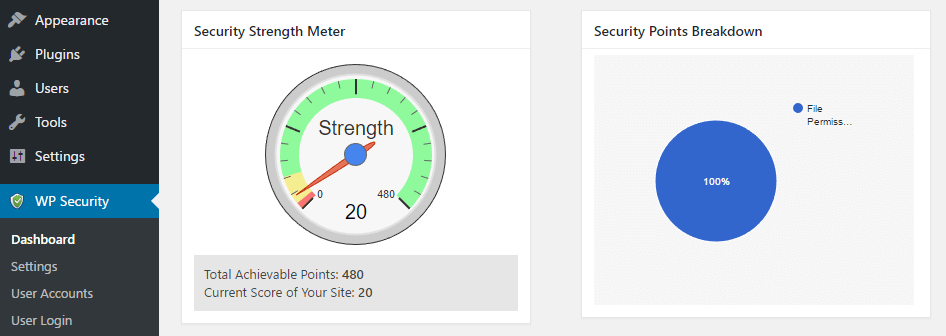
When you set up an online business, you will soon be flooded with security plug-in options. There are plenty of good ones available, depending on which platform you choose to run your store on. The key is to be sure that you are using the right ones to protect your business from all angles. Additionally, you want to consistently download updates to ensure they are current against the latest hacker strategies and are highly effective. Some sites will even show you how secure your website is with your existing plugins to help gauge where you need further protection.

4. Change Admin Passwords Regularly
Although it may seem arbitrary and annoying, you need to change your passwords and logins frequently to prevent security breaches. This is something that is super simple, yet highly effective for preventing costly mistakes.
Of course, employees should be taught proper password management and put it into practice. Passwords shouldn’t be the dog’s name or kid’s birthday. Every employee should also have their own log-in name rather than a generic shared admin account. This ensures that passwords are private and only known to individuals, and it can also help pinpoint what occurred if any mistakes happen.
5. Let Customers Take Control of Their Data Security
Although many companies want to gather as much data about their customers as possible, consumers will feel better about sharing private information if they know how it will be used. Some customers simply will not be comfortable sharing their shopping behavior data for marketing purposes, and they will appreciate an option to opt-out.
Your store should also offer customers some options to increase the security of their personal data through accounts with two-step verification. This means that once a customer enters in their user name and password, they are prompted for an additional security step – typically through a temporary code sent via email or text. Customers should also be able to control whether you are allowed to store their data, such as putting their credit card and shipping address on file.
Conclusion
Keeping your website safe and secure from hackers seems like an invisible battle. Sadly, many online companies don’t put a whole lot of thought and effort into the security of their website’s data until after something terrible occurs.
Data security doesn’t need to be complicated to be effective. There are some very simple steps to take that can have a significant effect on your business’s security. Keep these five in mind!