


Digital transformation has changed the realm of marketing, this in turn got accentuated customers intricately and continuously searching for the solutions to their problems online in the post-COVID era.
Most of the brands embraced a major shift in terms of how they communicated with their customers earlier and this involved brands getting more empathetic than ever before and communicating compassionately with their customers. Also, these unprecedented times made marketers realize the importance of B2B customer intent data more profoundly than ever before.
Intent data is not a new concept, but it’s one that’s just now becoming widely available to everyone in B2B marketing. Intent data is a type of sales intelligence that shows which leads or accounts are actively researching on third-party sites. When research on a particular topic is higher than usual, the account spikes on those topics.
Now let’s try to comprehend what actually is intent data more comprehensively. Your prospects are searching for the solutions you provide on multiple channels including search engines, third-party websites, social media channels, public forums, and pretty much everywhere. However, there are high chances that you would never know about it, if you operate a conventional MarTech stack and they will end up with some competitor of yours.
According to research from retaildrive.in, 8 out of 10 shoppers are researching products or services online before they make a purchase. The process involves an in-depth analysis of all the different solutions they come across to address their pain points. They never get in touch with any sales team and make an independent choice.
So, the only way out for the marketers in such a situation is to get insights about their prospects from multiple channels even if they are on third-party websites or just have initiated their search by feeding the search engine with a specific set of keywords. This is an example of third-party intent data.
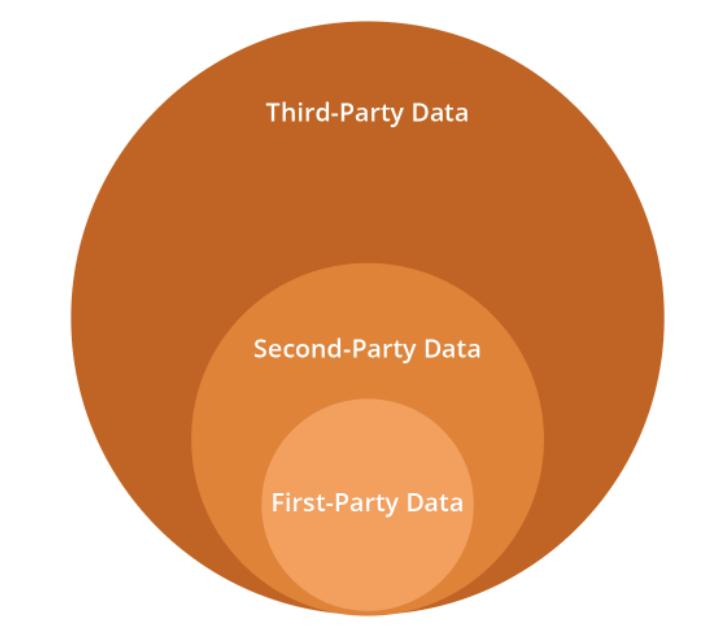
Categorically intent data is classified into two main types:
- First-Party Intent Data – This intent data is basically collected about your audience or customers from the web platforms owned by your business, hence the name; this includes the digital footprints and logs of your potential customers on your propriety website, data collected in your in-built CRM, data fetched from campaign analysis, information gathered from social media platforms, offline surveys, lead magnets and other sources.
- Third-Party Intent Data – This type of intent data is accumulated from third-party sources, from all web platforms that are not owned by your company. There can be several ways to source third-party intent data and marketers must leverage a trustworthy source that’s important to the methods of collection.
Several third-party channels may capture behavioral data, user actions, inclinations, and behavioral insights in an array of ways.
According to Bombora, Intent data is classified into the following three categories:

The intent inclinations or inclinations of the customers also called intent signals to fall under one of the following types:
- Intent signals based on keywords and queries
- Through cookies and online web portals
- Online actions performed on the website such as downloads
- Firmographic Data
- Precognitive Modelling and Lookalike Audience Research
How to Predict Customer Contact Intent with AI & Amazon Connect
Customers engage with business using multiple channels such as social media, audio-based platforms, and the web. Every interaction of the customer is a reflection of their intent and includes parameters such as customer identification, verification, and identification. The customer contact intent is often deciphered using either live assistance or automated methods. The prime inclination of utilizing the customer intent data is addressing the quickest possible resolution to the customer based on his primary pain point.
Legacy technologies caused customers to go browse through the menu trees to clarify their intent. This sort of is a reflection of the constraints imposed on businesses. Amazon Lex leverages Natural Language Understanding (NLU) technologies to enhance the customers’ experiences and to enable customers to express their contact intent in a lesser number of words.
Leveraging data ensures the process of data collection is simplified. Often the most recent set of interactions of the customers or events reflects the direct correlation with the content intent. For example, an eCommerce buyer might call the customer care helpline if there are some hindrances or doubts regarding the cart checkout process.
The major limitation with the in-built and domain-based conversational platforms is that all of them require a fixed domain and a technical heavy-lifting to design, build, maintain, adapt and optimize their operational functionalities. However, the integral problem with such approaches is that they lack agility, require the constant up-gradation of several data points from diverse channels across the web, and are not agile. By leveraging AI-as-a-service or rather pay-as-you-go AI/ML capabilities in the cloud, businesses can leverage the historical data points to learn and can generalize, and predict caller intents for streamlining and optimizing the customer interactions in the future.
By deploying the machine learning competencies from AWS (Amazon Web Services) customers can expect an intelligent, personalized, and faster resolution. This technique also allows businesses to reduce their technical maintenance costs, improve customer satisfaction scores, improve automation rates, and cut down on agent transfer costs. Let’s see a case to use Amazon Personalize and Amazon Connect to devise a solution:
Essential Understanding Required
To follow the above hypothetical process one must have a profound understanding of certain AWS components and features:
- Amazon Connect
- Amazon Lex
- Amazon Lambda
- Amazon Personalize
- Amazon SageMaker
- Amazon DynamoDB
- AWS Identity and Access Management (IAM)
- The AWS account must be a place with permission to create and modify Lambda functions, Amazon Personalize, Amazon S3 objects, and IAM roles
To start with one requires an Amazon Connect instance configured for inbound and outbound calls. After creating an instance one needs to claim a phone number and get started with Amazon Connect. One should refer to the official documentation of Amazon Connect for a better understanding and get started with the process.
Proposed Architecture
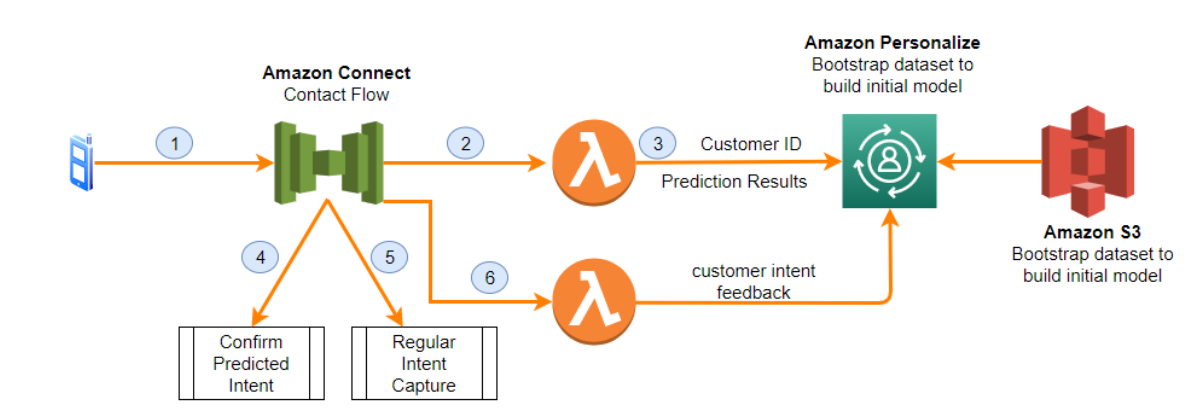

A Proposed Architecture for Taking Care of the Incoming Customer Calls
- Here’s what happens to an incoming contact:
- As a customer calls into a prescribed customer care number, this invokes an Amazon Connect contact flow
- Amazon Connect invokes a Lambda function; this happens by passing on a customer identification number within the contact flow
- The Lambda function invokes Amazon Personalize AI to provide marketers with recommendations based on the customer contact intent. Amazon Personalize leverages a trained model using the historical data of the activity of the contacts online from a segment of callers
- If the intent is predicted with a high confidence score, the Lambda function returns a predicted intent to Amazon Connect. The threshold value of the score is configurable. The contact flow in Amazon Connect allows the caller to confirm the intent predicted
- If this doesn’t happen, the Lambda function returns a value inferring the model that could predict an intent for this interaction. The contact flow in Amazon Connect proceeds with the intent capture experience using either Amazon Lex (NLU), or a menu
- Before the call ends, the actual intent of the customer is fed back to the Amazon Personalize API. This is used to enable future predictions for this caller
Solution Datasets
Here we have used two datasets 1. Users and 2. Interactions in a format prescribed by Amazon Personalize. The first step in the Amazon SageMaker notebook downloads user data formatted in the prescribed format for a publicly accessible web location. The training data for the initial training is created next.
- The Users dataset has a string attribute named User_ID. The dataset additionally can have the user identifier and optional profile metadata.
- The three required attributes of the Interactions dataset include User_ID (string), ITEM_ID (string), and TIMESTAMP (long). The sample contact center dataset has historical contact activity data of the users. ITEM_ID has the callers’ intent for the contact which is represented by a single word string. For example, a string AC_PA encodes a contact intent aligned to maybe a debit card and its corresponding PIN activation details that are aligned with a retail accounts product.
The entire dataset can be explored in the Amazon SageMaker notebook and can be eventually deployed. For those who want to use a different dataset, the dataset schema documentation from Amazon explains the format requirements for Amazon Personalize.
Deploying the Dataset Using AWS SageMaker
Step 1. Open Up the AWS SageMaker Notebook
The AWS CloudFormation template can be used to launch a SageMaker notebook instance. The IAM role and permissions will be required. This notebook can be used to download the sample data, and to train an Amazon Personalize model for the solution. The following steps must be followed:
- Log in to the AWS Management Console.
- Click on the “Launch Stack” button to launch a stack within AWS CloudFormation. Choose an appropriate region
- Click and acknowledge the statement: “I acknowledge that AWS CloudFormation might create IAM resources”
- Click on Create stack
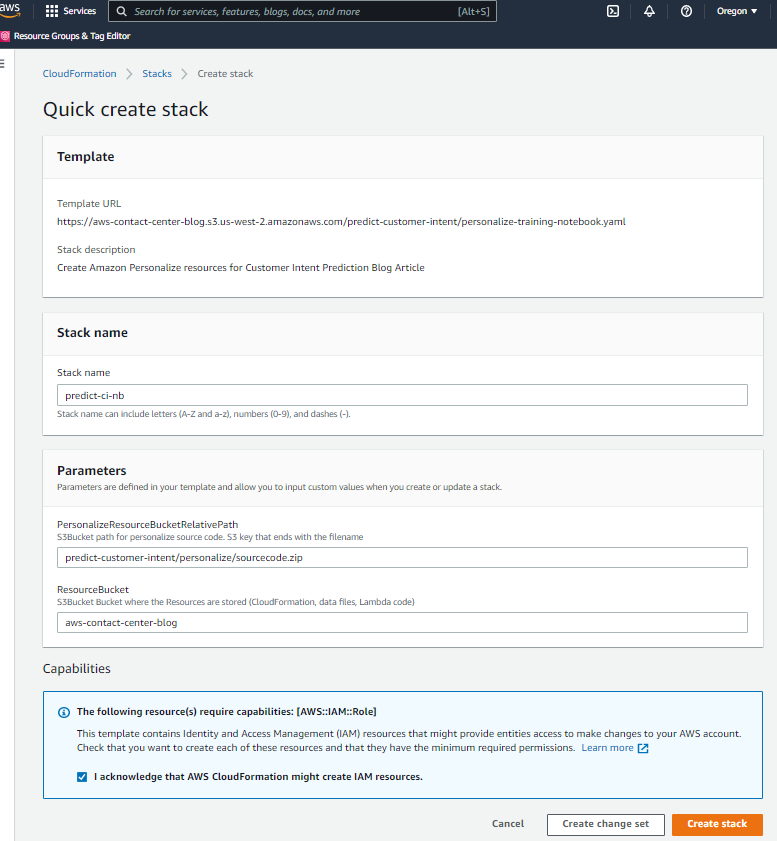

- Allow time until the CloudFormation stack moves from CREATE_IN_PROGRESS state to CREATE_COMPLETE condition which nearly takes 5 minutes


Step 2: Amazon Personalize campaign – Train & Deploy
- Open AWS SageMaker console from the AWS Management Console
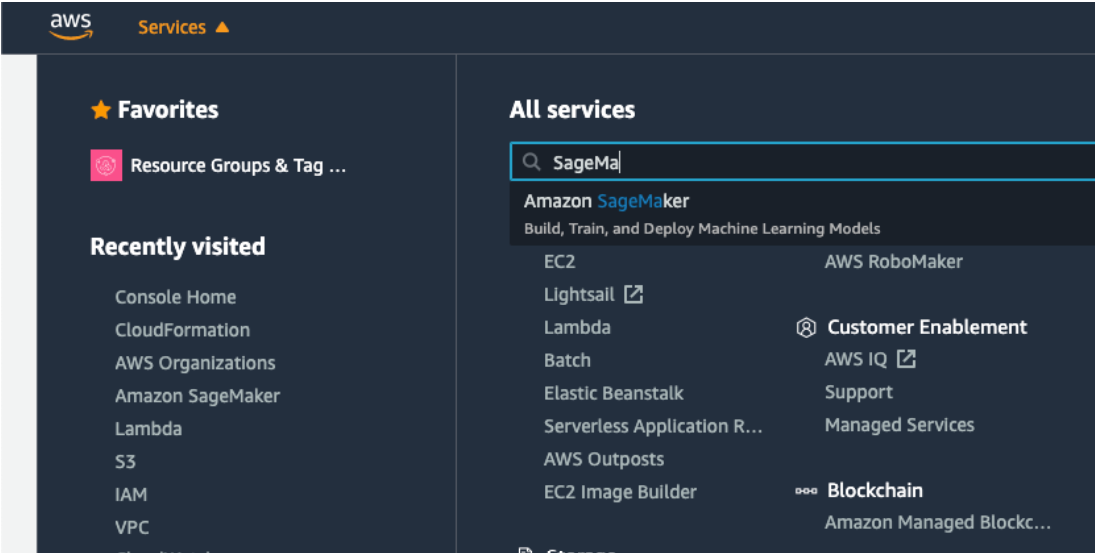

- From the navigation bar, choose Notebook instance and open the Jupyter Notebook web interface


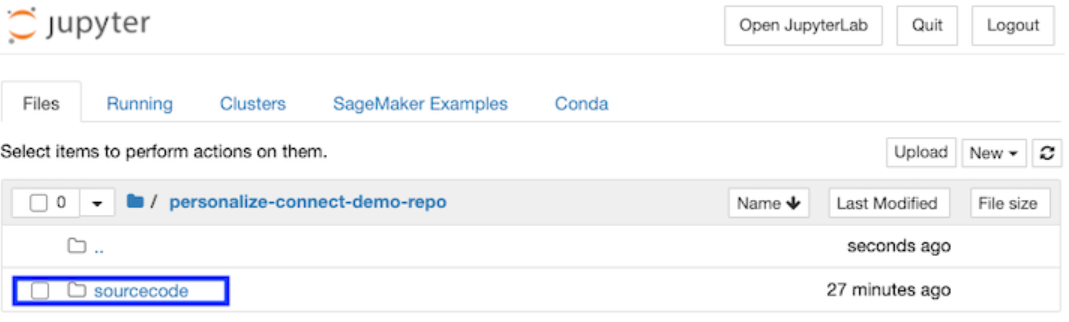
- Now on the web interface of Jupyter, choose sourcecode

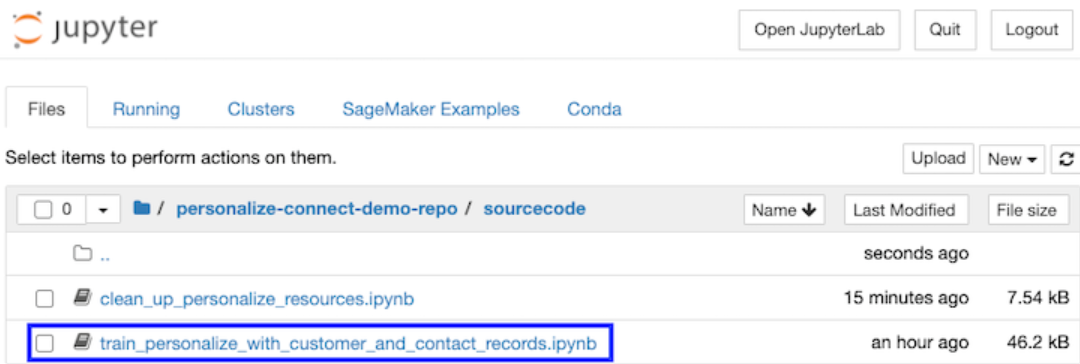
- Click on to launch a Python notebook from: train_personalize_with_customer_and_contact_records.ipynb

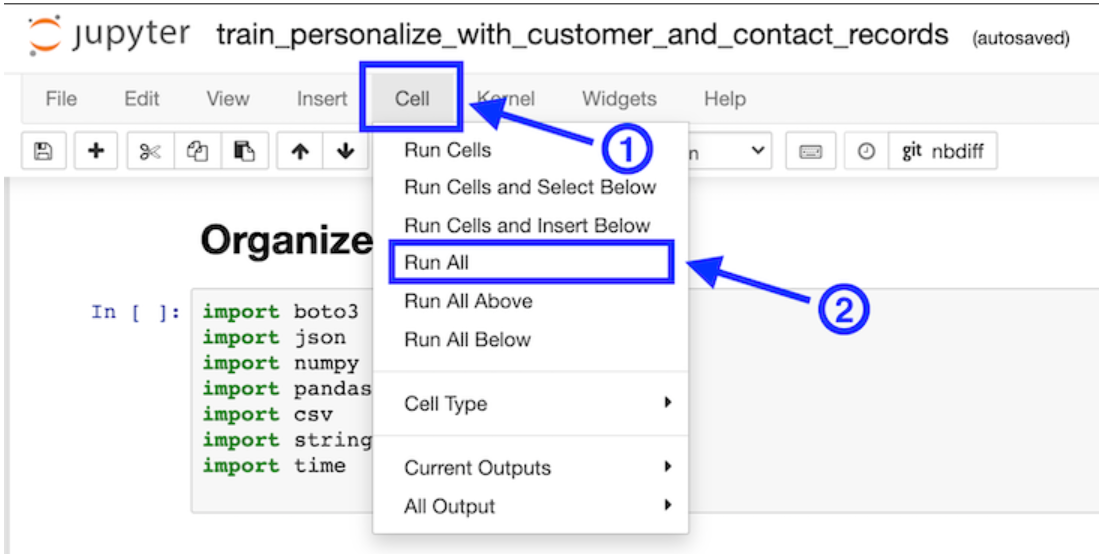
- From the top of the menu, choose Cells and then Run All. Here avoid clicking on the Run application from the toolbar as it makes you run each cell separately

- The notebook takes nearly 70 minutes to run and 3 cells take longer than others to finish running (for these steps, one can see the progress indicator status (CREATE IN_PROGRESS) every minute in the form of a console message until it reaches a final status (ACTIVE). One is not expected to close the browser window with the notebook instance until all the cells have finished running
- After the cells have finished running, the values of campaign_arn and tracking _id variable outputs can be fetched from the bottom of the notebook


Step 3: Deploy Lambda Functions
The AWS CloudFormation template following creates two Lambda functions with required IAM roles and permissions. These functions perform Amazon Personalize API operations and expose the necessary outcomes to Amazon Connect.
- One needs to log in to their AWS Management Console.
- Thereafter, the following button can be chosen to launch the stack in AWS CloudFormation.


- Enter the values for two parameters in the Parameters section PersonalizeCampaignARN and PersonalizeModelTrackingID that have been copied from the notebook console earlier
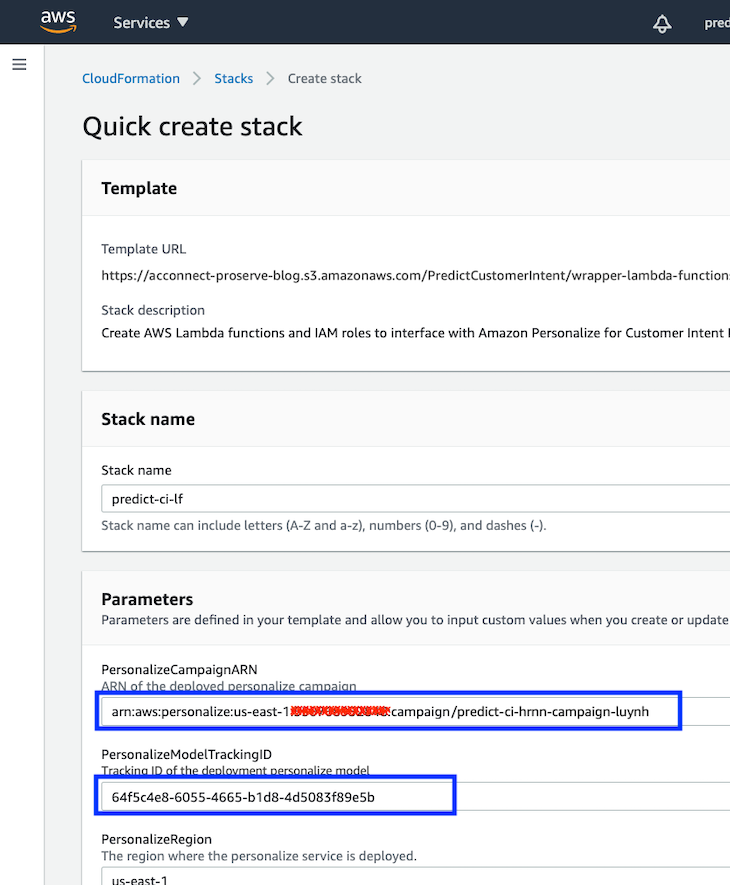

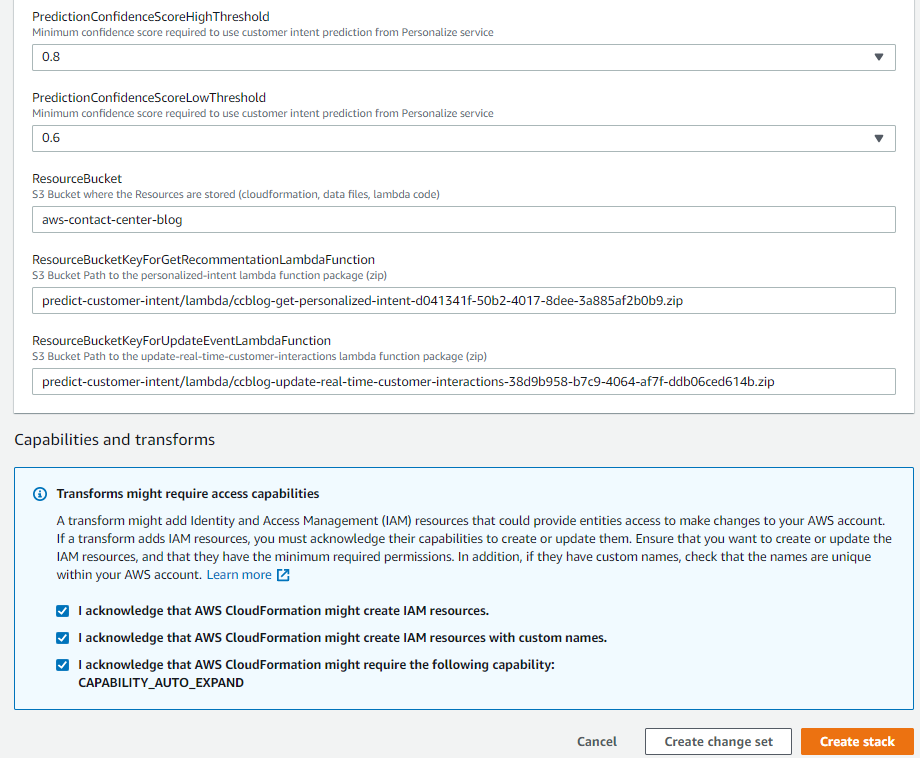
- All the acknowledgment boxes about IAM resources and capabilities must be checked
- Thereafter choose Create stack

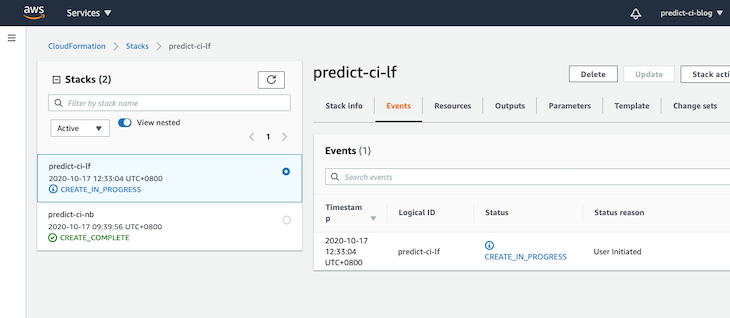
- Wait until the CloudFormation stack moves from Create_In_Progress state to Create_Complete state (which takes nearly 5 minutes). The CloudFormation stack launches two AWS Lambda functions with required IAM roles and permissions

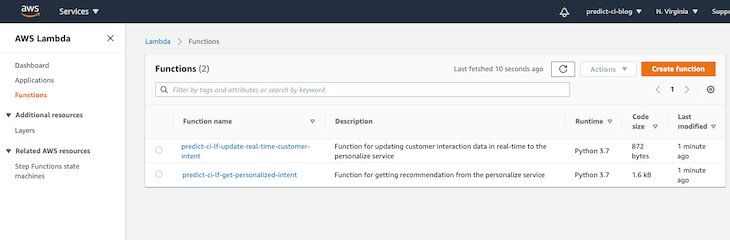
- From AWS Management Console, open AWS Lambda console


- Verify that you are able to see two recently deployed AWS Lambda functions named predict-ci-li-update-real-time-customer-intent and predict-ci-li-get-personalized-intent

Step 4: Allow Amazon Connect to Run Your Lambda Function
We must verify that Amazon Connect Instance has permission to access this newly created AWS Lambda function by following the steps described below:
- Open the Amazon Connect console from AWS Management Console
- Select your Amazon Connect virtual contact center instance
- Choose Contact flows and scroll down to the AWS Lambda section
- On the Function drop-down menu, select predict-ci-lf-get-personalized-intent function and choose +Add Lambda Function


On the function drop-down menu, select predict-ci-lf-update-real-time-customer-intent function and choose +Add Lambda Function
Step 5: Import and Configure the Amazon Connect Contact Flow
- Download the pre-built contact flow
- Open the Amazon Connect console from the AWS Management Console
- Select your Amazon Connect virtual contact instance and log in
- On the Amazon Connect, from the console navigation bar choose Routing and Contact flows
- Choose to Create contact flow button at the top-right
- Choose Select and select the PredictCustomerIntentFlow file downloaded in step 1
- Find the Invoke AWS Lambda block and on the contact flow open the settings for the block by selecting the header
- Select the Lambda function predict-ci-lf-get-personalized-intent that you granted Amazon Connect permissions in Step 4
- Select Save and choose the header for the Invoke AWS Lambda function block (second row) and select Lambda function predict-ci-lf-update-real-time-customer-intent
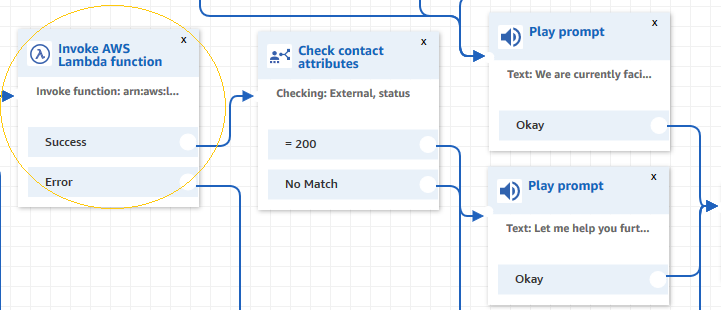

- Choose Save and then Save and Publish your contact flow
The pre-built contact flow PredictCustomerIntentFlow consists of the following steps:
- Select the basics such as logging, recording, and default voice using Amazon Polly (US-English)
- Greet the caller and prompt for identification; in the blog post use a 5-digit account number as an identifier
- Invoke the predict-ci-lf-get-personalized-intent function to retrieve the recommended intent prediction for this caller
- The caller must be prompted to confirm the predicted intent (high intent score) or ask the caller to describe the contact intent
- Invoke the predict-ci-lf-get-personalized-intent function to retrieve the recommended intent prediction for the caller
- The caller must be prompted to confirm the predicted intent (high confidence score) or question the caller to describe the contact intent
- Invoke the predict-ci-lf-update-real-time-customer-intent function to provide a real-time update on the intent that the customer has entered or confirmed


Step 6: Try it out
- In your Amazon Connect instance, choose the Routing icon from the navigation bar, and choose Phone numbers
- Choose the phone number that you wish to associate with your new contact flow to edit
- Choose the name of your contact flow from the Contact flow/ IVR drop-down menu, and choose Save
- To make a test call, call the phone number you associate with the flow
- Prediction test call made with High-Confidence – Use a customer identifier with a recent contact history record in the dataset results in a prediction with a high confidence score. Next, the 5-digit customer identifier 35739 must be entered with an intent prediction based on a prior transaction for this user identifier in the dataset
- Test call made with low confidence – A customer identifier that is new to a dataset with no recent contact history results in a prediction with a low confidence score. The 5-digit customer identifier 89789 is presented with the IVR main menu. The prediction score is insufficient to present a personalized prediction. With the help of a sample menu, one can deduce two options (home loans, and credit cards) to bootstrap new customer interactions
- In both cases, the IVR captures and reinforces, and confirms the actual intent of the customer. This data is used to make predictions for subsequent calls. If one calls again by using the same customer identifier, one might get different intent prediction results dynamically. Amazon Personalize updates the dataset in the real-time and is able to adjust the recommendations accordingly
Assumptions
A sample dataset is injected with some activity patterns. For enterprise use cases, it is recommended that the customer interaction dataset is used, such as that available from multiple channels such as online, email, and mobile in addition to the contact center. The prediction results are more accurate with interactions and event data from all contact channels considered together.
Logic can be used along with predictions along with programming rules. If these rules are the application for interaction, this can be prioritized before a prediction.
Data Clean Up
To avoid ongoing charges, follow the step below:
- Open the clean_up_personalize_resources.ipynb notebook from the sourcecode in the SageMaker notebook
- On the top menu bar, choose Cells, Run All to delete the personalize artifacts, Amazon S3 objects, and buckets created by SageMaker notebook. (If one clicks on the Run option available on the toolbar, one will require to run each cell separately.)
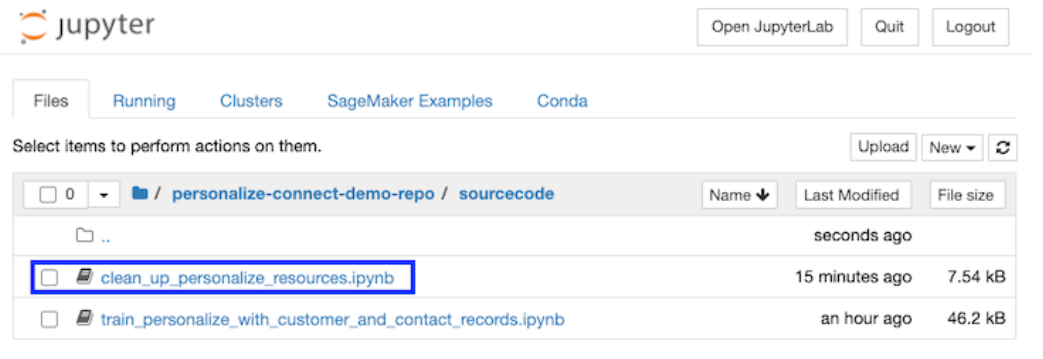

- To remove the associated AWS resources for this solution, one must delete the CloudFormation stacks, taking one at a time


Conclusion
When a customer contacts your business, you want to help make sure they get the experience they want. Predicting customer contact intent simplifies and improves customer experience. Automating the predicted intents in Amazon Connect means you are able to predict customer contact intent before connecting a customer to an agent has many benefits. For example, it reduces the time it takes to handle calls, improves routing accuracy, and reduces handoffs between agents. Amazon Connect can significantly reduce the time it takes to implement a machine learning model from scratch.
Predicting customer contact intent simplifies and improves customer experience. It reduces the time it takes to implement a machine learning model from scratch, and can also result in higher self-service rates. . For example, calls where customers have a question about subscription services can be routed directly to an agent while calls that require account management with billing details can be routed to a specialized billing account manager.