



Spark Streaming wasn’t the first streaming architecture. Over time, multiple technologies have been developed in order to address various real-time processing needs. One of the first popular stream processor technologies was Twitter Storm, and it was used in many businesses.
Spark includes the streaming library, which has grown to become the most widely used technology today. This is mainly because Spark Streaming holds some significant advantages over all of the other technologies, the most important being its integration of Spark Streaming APIs within its core API. Not only that, but Spark Streaming is also integrated with Spark ML and Spark SQL, along with GraphX.
Because of all of these integrations, Spark is a powerful and versatile streaming technology.
This tutorial has been taken from Big Data Analytics with Hadoop 3 written by Sridhar Alla and published by Packt.
Note that you can find more information here on Spark Streaming Flink, Heron (Twitter Storm’s successor), and Samza and their various features; for example, their ability to handle events while minimizing latency. However, Spark Streaming consumes data and processes it in microbatches. The size of these microbatches is of a minimum of 500 milliseconds.
Spark Streaming works by creating batches of events at certain time intervals, as configured by the user, and delivering them for processing at another specified time interval.
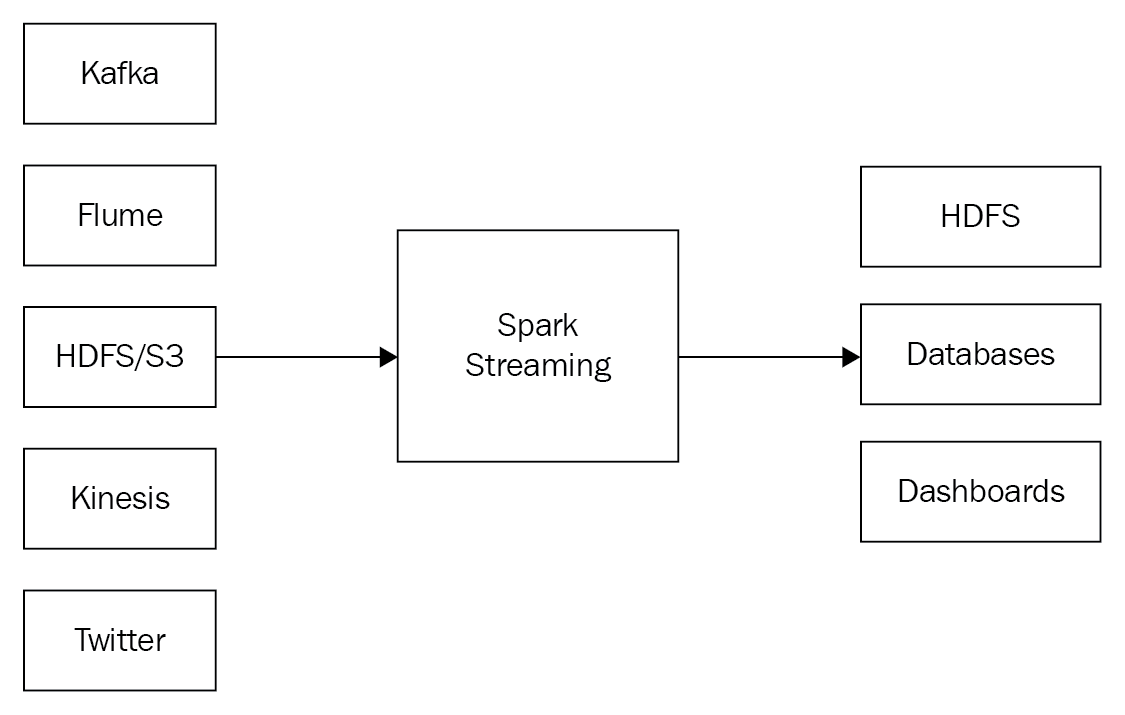
Spark Streaming supports several input sources and can write results to several sinks:

Similar to SparkContext, Spark Streaming contains a StreamingContext, the primary point of entry for the streaming to take place. The StreamingContext depends on the SparkContext, and theSparkContextcan actually be used directly in the streaming task. StreamingContext is similar to SparkContext, the difference being that StreamingContext requires a specification, by the program, of a time interval/duration of batching interval, ranging from minutes to milliseconds:
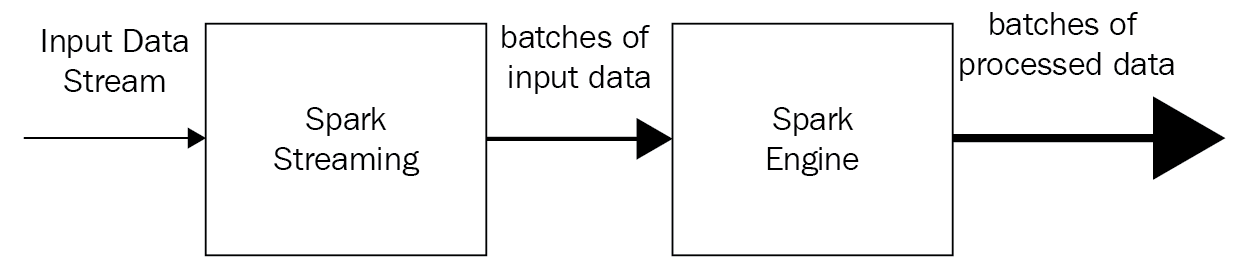
Note: The SparkContext is the main point of entry. The StreamingContext reuses the logic that is part of SparkContext(task scheduling and resource management).
StreamingContext
As the main point of entry for streaming, StreamingContext handles the streaming application’s actions, including checkpointing and transformations of the RDD.
Creating StreamingContext
A new StreamingContext may be created in one of several ways.
- You can create a StreamingContext by using an existing SparkContext:
StreamingContext(sparkContext: SparkContext, batchDuration: Duration)
scala> val ssc = new StreamingContext(sc, Seconds(10))
- Create a StreamingContext by providing the configuration necessary for a new one:
StreamingContext(conf: SparkConf, batchDuration: Duration)
scala> val conf = newSparkConf().setMaster(“local[1]”).setAppName(“TextStreams”)
scala> val ssc = new StreamingContext(conf, Seconds(10))
- The getOrCreate function is used to recreate a StreamingContext from a previous checkpoint data piece, or to create a new StreamingContext. If the data does not exist, then the StreamingContext will be created by calling the provided creatingFunc as follows:
def getOrCreate(
checkpointPath: String,
creatingFunc: () => StreamingContext,
hadoopConf: Configuration = SparkHadoopUtil.get.conf,
createOnError: Boolean = false
): StreamingContext
Starting StreamingContext
The streaming application is started by starting the execution of the streams defined using the StreamingContext:
def start(): Unit
scala> ssc.start()
Stopping StreamingContext
All processing stops when the StreamingContext is stopped. You will need to create a new StreamingContext, and you must invoke start() to restart the application. There are two useful APIs to stop stream processing:
- Stop stream execution immediately (this does not wait for received data to be processed) by using the following:
def stop(stopSparkContext: Boolean)
scala> ssc.stop(false)
- Stop the execution of the streams, with an option for allowing the received data to be processed, by using the following:
def stop(stopSparkContext: Boolean, stopGracefully: Boolean)
scala> ssc.stop(true, true)
Input streams
Several types of input streams exists, all of which need StreamingContext to be created, as shown in the following sections.
receiverStream
An input stream is created with any user-implemented receiver. It is customizable:
API declaration for receiverStream:
def receiverStream[T]: ClassTag](receiver: Receiver[T]):
ReceiverInputDStream[T]
socketTextStream
The socketTextStream uses the TCP source hostname:port to create an input stream. Data is received through the TCP socket, and the received bytes are interpreted as UTF8, encoded in n delimiter lines:
def socketTextStream(hostname: String, port: Int,
storageLevel: StorageLevel = StorageLevel.MEMORY_AND_DISK_SER_2):
ReceiverInputDStream[String]
rawSocketStream
The rawSocketStream uses the network source hostname:port to create an input stream. It is the most efficient method with which to receive data:
def rawSocketStream[T: ClassTag](hostname: String, port: Int,
storageLevel: StorageLevel = StorageLevel.MEMORY_AND_DISK_SER_2):
ReceiverInputDStream[T]
Here is the Preview of the book.