


Source control is a vital part of any software development process. The key purpose of source control is to keep track of the changes done to the application codebase while enabling multiple developers to work on the same application without conflicting with each other’s work.
You will inevitably encounter different kinds of errors when dealing with the most popular source control platform Git. In this post, we will look at the Fatal: refusing to merge unrelated histories error and how to mitigate such errors in the future.
What is the reason for the Fatal: refusing to merge unrelated histories error?
This error occurs when a user tries to merge two unrelated projects into a single branch. Since they are two different projects, the commit histories and tags of each project will be different, leading to an incompatible history.
Now, let’s look at some common scenarios where users will encounter this error.
â— One of the most common occurrences is while trying to pull data from a remote repository. Assume that you have initialized a new Git repository in your local machine and made some commits, and now you want to get data from a remote repository. At this point, you will encounter this error as the local repo and the remote repo have two different histories making Git unable to align them properly.
â— Then comes the age-old issue of corrupted data. Despite the repository location, we will encounter this error while trying to merge if the underlying data is corrupted or repository data is deleted. This error can also occur if you have cloned a project with corrupted downloads. In all these instances, Git does not have the necessary information to understand the structure and content of the repositories, which leads to this error.
Fixing the Fatal: refusing to merge unrelated histories error
The simplest method to deal with this error is to use the –allow-unrelated-histories option. As the name suggests, this option will allow repositories with unrelated histories to be merged together.
For example, let’s consider the following scenario. Assume we have a remote repository named “project_green” with two branches (master and feature/test1), each consisting of three and four commit histories, respectively.
Then we created a local Git repository named “project_red” hoping to improve the feature/test1 branch of “project_green.” We have created some files and made a single commit within the master branch of “project_red.”
Now we want to pull data from “project_green.” However, we will encounter the “Fatal: refusing to merge unrelated histories” error if we try to pull as usual since we are dealing with two different projects with unrelated histories.
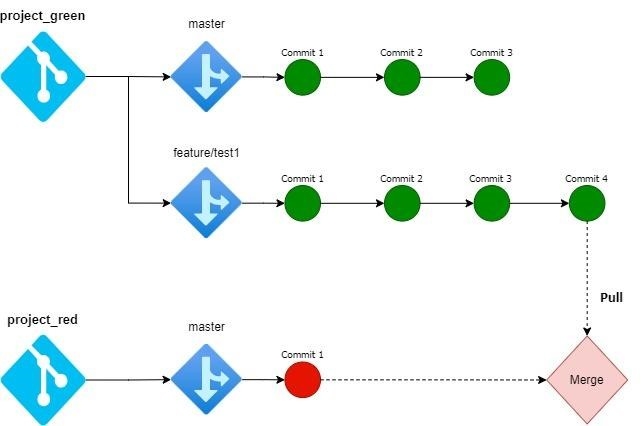
The solution to the above issue is to utilize the –allow-unrelated-histories option when pulling the remote repository. The format of the git command used in this situation will be as follows,

This way, we can use the following command to pull the data from “project_green.”

You can seamlessly merge two unrelated branches using the above command. However, if there are any file conflicts, users will have to use the normal Git resolution process to resolve the conflicts. This method allows users to combine unrelated projects/branches with different histories easily. Another way to fix this issue will be to unstage the changes and get the remote repository. The workflow for this method will be as follows.This way, we can use the following command to pull the data from “project_green.”
- Unstage the files so that git will not include them in source control.
- Stash the unstaged files for later usage so that they will not be included in the current working directory.
- Clone/Download the remote repository.
- Unstash the previously stashed files and finally create a commit with all the files.
Preventing the Fatal: refusing to merge unrelated histories error
The easiest way to prevent this error is to avoid merging unrelated projects with conflicting histories or clone the required repository before starting any development. However, in practice, there are instances where users need to merge different projects.
In such a situation, the recommended practice is to clone the remote repository as a new branch in the project other than trying to merge them directly. Then manually merge the two branches together. While this process can be time-consuming, it might be the only choice when dealing with complex code bases. Therefore, it’s always advisable to try to mitigate such scenarios as much as possible.
Conclusion
The “Fatal: refusing to merge unrelated histories” error relates to occurrences where Git is unable to match histories of two different projects. In this post, we had a look at common scenarios that can cause this error as well as how to fix it. Depending on the project, context, and requirement, users can follow any of the methods mentioned here to resolve their merge issues and combine two unrelated projects.
