



In this post, we will compare two of the most popular NoSQL databases: Redis and MongoDB (in an altered form).
Redis is a popular in-memory data structure store that stores data as key-value pairs. It is primarily used as a very fast data structure store, a cache, or a message broker among other things. Being in-memory, it is the data store of choice when response times triumphs everything else.
MongoDB is an on-disk document store that provides a JSON interface to data and has a very rich query language. Known for it’s speed, efficiency and scalability, it is the most popular NoSQL database currently. However, being on-disk, MongoDB can’t compare favorably to an in-memory database like Redis in terms of absolute performance. But with the availability of the in-memory storage engines for MongoDB, a more direct comparison becomes feasible.
Percona Memory Engine for MongoDB
Starting with version 3.0, MongoDB provides an API to plug in a storage engine of your choice. A storage engine, from the MongoDB context, is the component of the database that is responsible for managing how data is stored, both in-memory and on-disk. MongoDB supports an in-memory storage engine; however, it’s currently limited to the Enterprise edition of the product. In 2016, Percona released an in-memory engine for MongoDB Community Edition called the Percona Memory Engine for MongoDB that is open source. Like MonogDB’s in-memory engine, it too is a variation of the WiredTiger storage engine but with no persistence to disk.
Advantages of Redis as a Cache
With an in-memory MongoDB storage engine in place, we have a level playing field between Redis and MongoDB. However, what is still the need to compare the two? Let’s look at the advantages of each of them as caching solutions.
Let’s look at Redis first.
-
A well-known caching solution that excels at it.
-
Redis isn’t a plain cache solution “ it provides advanced data structures that provide a lot of powerful ways to save and query data which can’t be achieved with a vanilla key-value cache.
-
Redis is fairly simple to setup, use and learn.
-
Redis provides persistence should you choose to set it up. So cache warming in case of crashes is hassle free.
Some disadvantages for Redis are: it doesn’t have in-built encryption on wire, RBAC, a seamless, mature clustering solution, and can be a pain to deploy of large-scale cloud deployments, etc.
Advantages of MongoDB as a Cache
-
MongoDB is a more traditional database with advanced data manipulation features (think aggregations and map-reduce) and a rich query language.
-
Has SSL, RBAC and scale-out built in.
-
If you are already using MongoDB as your primary database, then your operational and development costs drop as there would be just one database to learn and manage.
Look at this post from Peter on where the MongoDB in-memory engine might be a good fit.
One significant disadvantage for MongoDB with an in-memory engine is that it offers no persistence until it is deployed as a replica set with persistence configured on the read replica(s).
In this post, we will focus on quantifying the performance differences between Redis and MongoDB. Operational differences and qualitative comparison will be covered in subsequent posts.
Redis vs In-Memory MongoDB: Performance
TL;DR
-
Redis performs considerably better for reads for all sorts of workload and better for writes as the workloads increase.
-
Even though MongoDB utilizes all the cores of the system, it gets CPU-bound comparatively early. While it had compute available, it was better at writes than Redis.
-
Both of the databases are eventually compute-bound. And even though Redis is single-threaded, it (mostly) gets more done with running on one core than MongoDB does while saturating all the cores.
-
Redis, for non-trivial data sets, uses a lot more RAM compared to MongoDB to store the same amount of data.
Configuration
The tool we used to measure performance was YCSB. We have been using YCSB to compare and benchmark performance of MongoDB on various cloud providers and for various configurations in the past. We assume a basic understanding of YCSB workloads and features in the test rig description.
-
Database instance type – AWS EC2 c4.xlarge featuring 4 cores, 7.5 GB memory and enhanced networking to ensure we don’t have network bottlenecks.
-
Client Machine – AWS EC2 c4.xlarge in the same VPC as the database servers.
-
Redis “ version 3.2.8 with AOF and RDB turned off. Standalone.
-
MongoDB “ Percona Memory Engine based on MongoDB version 3.2.12. Standalone.
-
Network Throughput: Measured via iperf as recommended by AWS:
-
Test Complete. Summary Results:
[ ID] Interval Transfer Bandwidth Retr
[ 4] 0.00-60.00 sec 8.99 GBytes 1.29 Gbits/sec 146 sender
[ 4] 0.00-60.00 sec 8.99 GBytes 1.29 Gbits/sec receive
r
-
Workload Details –
-
Insert Workload: 100 % Write “ 2.5 million records
-
Workload A: Update heavy workload “ 50%/50% Reads/Writes “ 25 million operations
-
Workload B: Read mostly workload “ 95%/5% Reads/Writes “ 25 million operations
-
-
Client Load “ Throughput and latency measured over incrementally increasing loads generated from the client by increasing the number of YCSB client load threads, starting at 8 and growing in multiples of 2.
Results
Workload B Performance
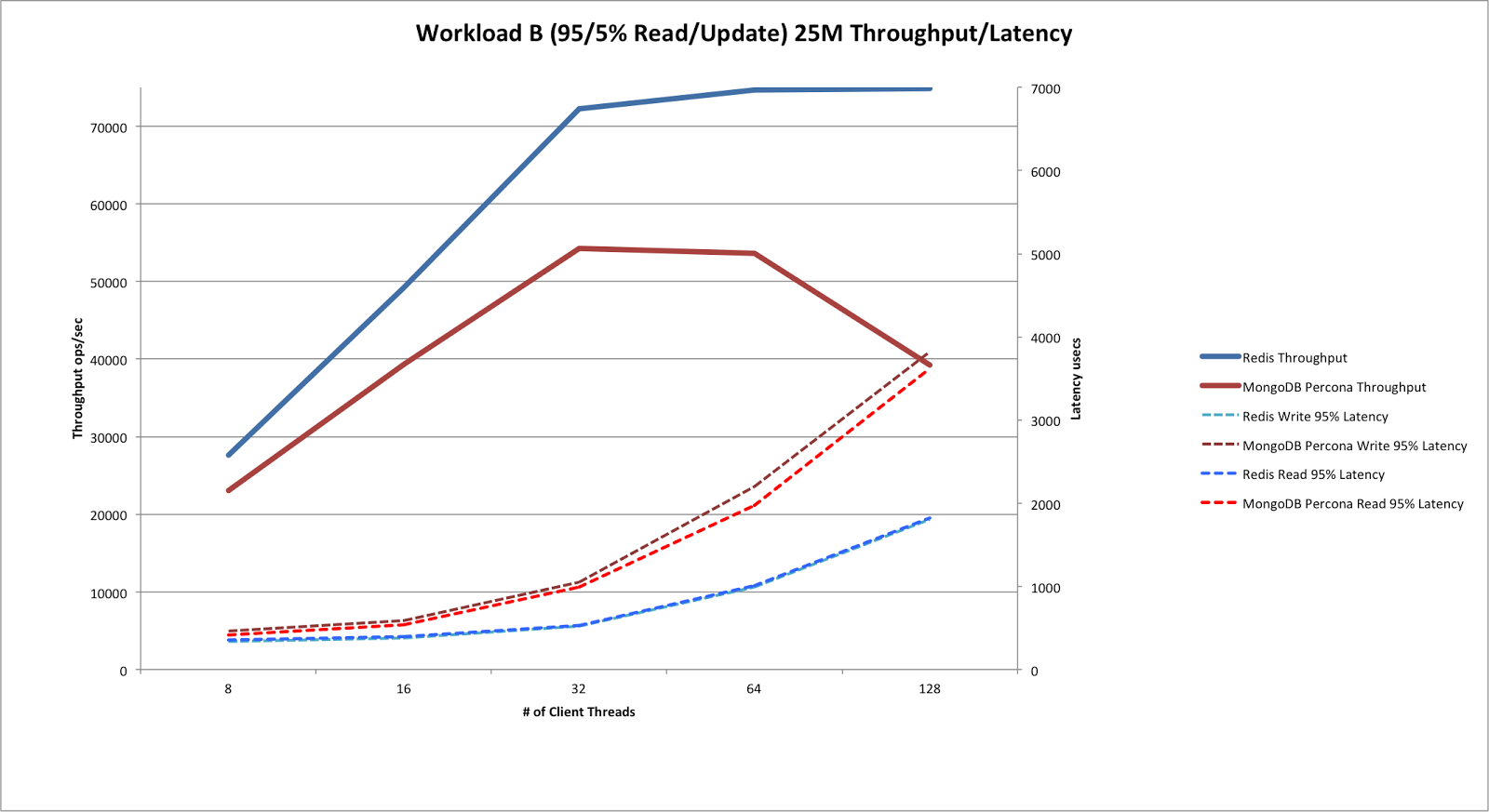
Since the primary use case for in-memory databases is cache, let’s look at Workload B first.
Here are the throughput/latency numbers from the 25 million operations workload. The ration of reads:writes was 95:5. This would be a representative cache reading workload.

Observations during the run
-
For MongoDB, CPU was saturated by 32 threads onwards. Greater than 300% usage with single digit idle %ages.
-
For Redis, CPU utilization never crossed 95%. So Redis was consistently doing considerably better than MongoDB while running on a single thread, while MongoDB was saturating all the cores of the machine.
-
For Redis, at 128 threads, runs used to fail often with read timeout exceptions.
Workload A Performance
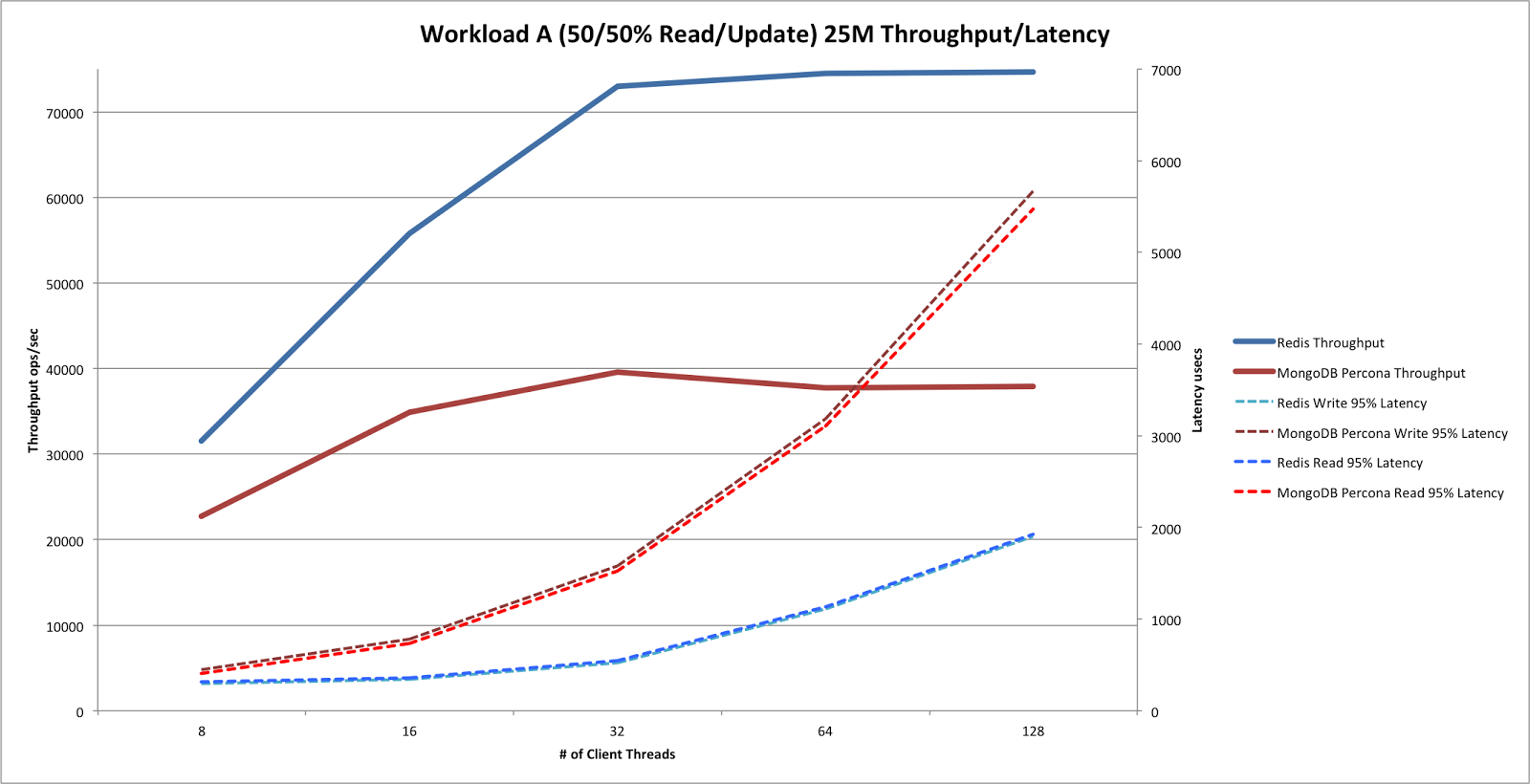
Here are the throughput/latency numbers from the 25 million operations workload. The ration of reads:writes was 50:50.
Observations during the run
-
For MongoDB, CPU was saturated by 32 threads onwards. Greater than 300% usage with single digit idle %ages.
-
For Redis, CPU utilization never crossed 95%.
-
For Redis, by 64 threads and above, runs failed often with read timeout exceptions.
Insert Workload Performance
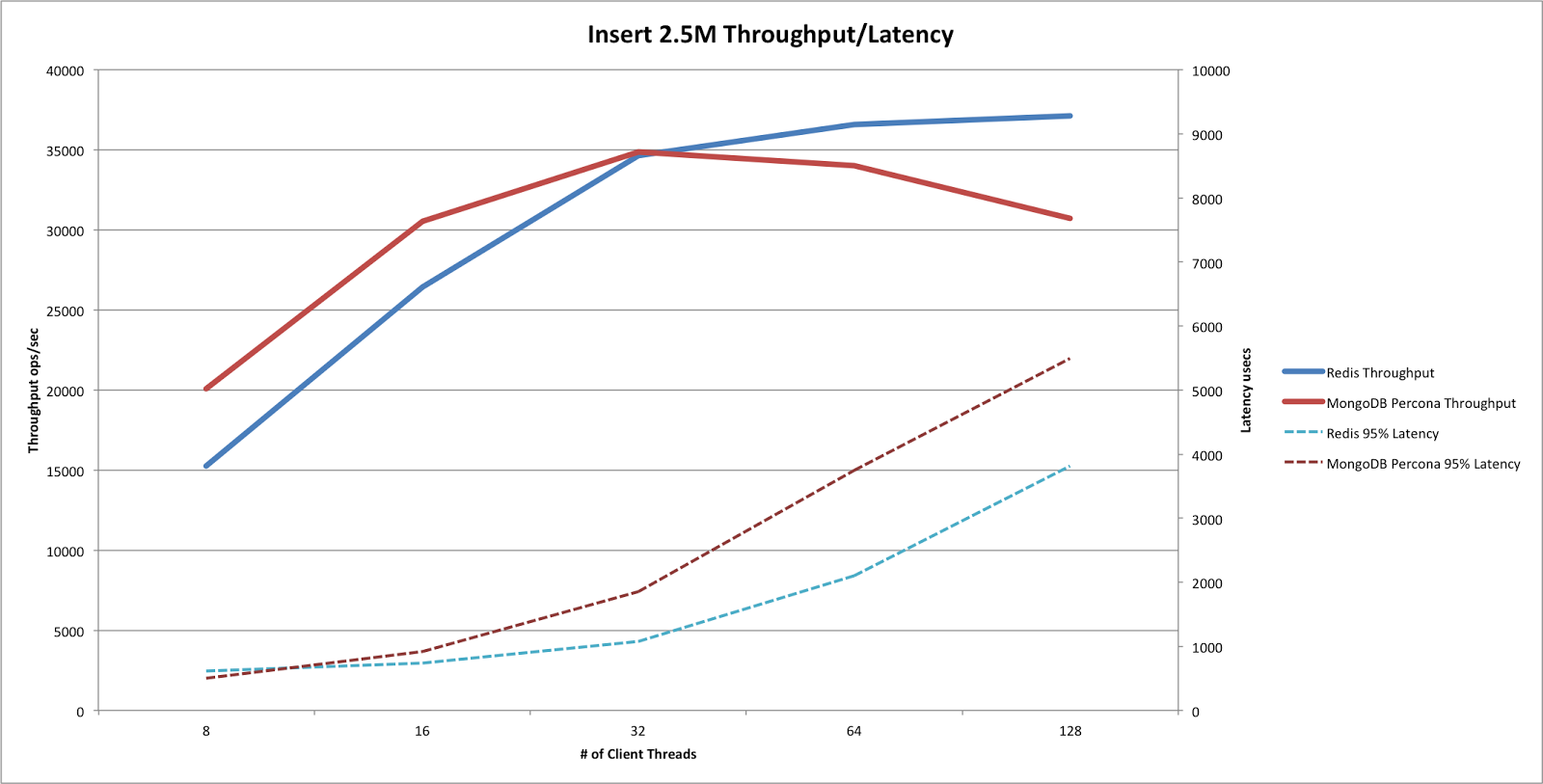
Finally, here are the throughput/latency numbers from the 2.5 million record insertion workload. The number of records was selected to ensure that total memory used in case of Redis did not exceed 80% (since Redis is a memory hog. See Appendix B).
Observations during the run
-
For MongoDB, CPU was saturated by 32 threads onwards. Greater than 300% usage with single digit idle %ages.
-
For Redis, CPU utilization never crossed 95%.
Appendices
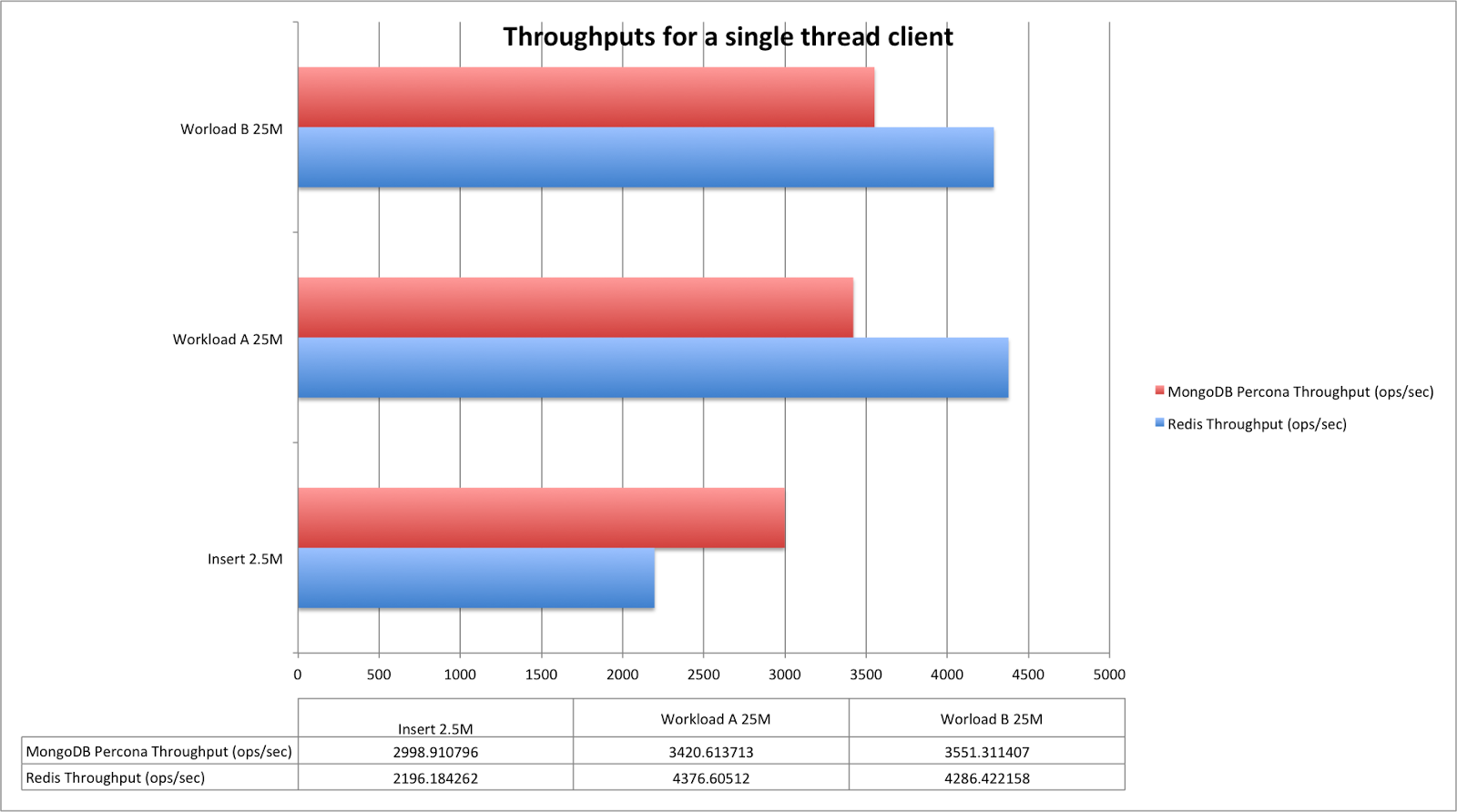
A: Single-Thread Performance
I had a strong urge to find this out “ even though it is not very useful in real world conditions: who would be better when applied the same load from a single thread. That is, the performance of a single threaded application.
B: Database Size
The default format of records inserted by YCSB are: each record is of 10 fields and each field is of 100 bytes. Assuming each record to be around 1KB, the total expected size in memory would be upwards of 2.4 GB. There was a stark contrast in the actual sizes as seen on the databases.
MongoDB
> db.usertable.count()
2500000
> db.usertable.findOne()
{
"_id" : "user6284781860667377211",
    "field1" : BinData(0,"OUlxLllnPC0sJEovLTpyL18jNjk6ME8vKzF4Kzt2OUEz

MSEwMkBvPytyODZ4Plk7KzRmK0FzOiYoNFU1O185KFB/IVF7

LykmPkE9NF1pLDFoNih0KiIwJU89K0ElMSAgKCF+Lg=="),
    "field0" : BinData(0,"ODlwIzg0Ll5vK1s7NUV1O0htOVRnMk53JEd3

KiwuOFN7Mj5oJ1FpM11nJ1hjK0BvOExhK1Y/LjEiJDByM14zPDtg

PlcpKVYzI1kvKEc5PyY6OFs9PUMpLEltNEI/OUgzIFcnNQ=="),
    "field7" : BinData(0,"N155M1ZxPSh4O1B7IFUzJFNzNEB1OiAsM0J/NiMoIj9sP

1Y1Kz9mKkJ/OiQsMSk2OCouKU1jOltrMj4iKEUzNCVqIV4lJC0qIFY3

MUo9MFQrLUJrITdqOjJ6NVs9LVcjNExxIg=="),
    "field6" : BinData(0,"Njw6JVQnMyVmOiZyPFxrPz08IU1vO1JpIyZ0I1tx

PC9uN155Ij5iPi5oJSIsKVFhP0JxM1svMkphL0VlNzdsOlQxKUQn

JF4xPkk9PUczNiF8MzdkNy9sLjg6NCNwIy1sKTw6MA=="),
    "field9" : BinData(0,"KDRqP1o3KzwgNUlzPjwgJEgtJC44PUUlPkknKU5pL

zkuLEAtIlg9JFwpKzBqIzo2MCIoKTxgNU9tIz84OFB/MzJ4Pjwo

PCYyNj9mOjY+KU09JUk1I0l9O0s/IEUhNU05NShiNg=="),
    "field8" : BinData(0,"NDFiOj9mJyY6KTskO0A/OVg/NkchKEFtJUprIlJr

PjYsKT98JyI8KFwzOEE7ICR4LUF9JkU1KyRkKikoK0g3MEMx

KChsL10pKkAvPFRxLkxhOlotJFZlM0N/LiR4PjlqJ0FtOw=="),
    "field3" : BinData(0,"OSYoJTR+JEp9K00pKj0iITVuIzVqPkBpJFN9My

k4PDhqOjVuP1YhPSM2MFp/Kz14PTF4Mlk3PkhzKlx3L0xtKjkq

PCY4JF0vIic6LEx7PVBzI0U9KEM1KDV4NiEuKFx5MiZyPw=="),
    "field2" : BinData(0,"Njd8LywkPlg9IFl7KlE5LV83ISskPVQpNDYgMEpr

OkprMy06LlotMUF5LDZ0IldzLl0tJVkjMTdgJkNxITFsNismLD

xuIyYoNDgsLTc+OVpzKkBlMDtoLyBgLlctLCxsKzl+Mw=="),
    "field5" : BinData(0,"OCJiNlI1O0djK1BtIyc4LEQzNj9wPyQiPT8iNE1

pODI2LShqNDg4JF1jNiZiNjZuNE5lNzA8OCAgMDp2OVkjNVU

3MzIuJTgkNDp0IyVkJyk6IEEvKzVyK1s9PEAhKUJvPDxyOw=="),
    "field4" : BinData(0,"OFN1I0B7N1knNSR2LFp7PjUyPlJjP15jIUdlN

0AhNEkhMC9+Lkd5P10jO1B3K10/I0orIUI1NzYuME81I0Y1N

SYkMCxyI0w/LTc8PCEgJUZvMiQiIkIhPCF4LyN6K14rIUJlJg==")
}

> db.runCommand({ dbStats: 1, scale: 1 })
{

    "db" : "ycsb",
"collections" : 1,
"objects" : 2500000,
"avgObjSize" : 1167.8795252,
"dataSize" : 2919698813,
"storageSize" : 2919698813,
"numExtents" : 0,
"indexes" : 1,
"indexSize" : 76717901,
"ok" : 1
}
So the space taken is ~2.7GB. This is pretty close to what we expected.
Redis
Let’s look at Redis now.
> info keyspace

# Keyspace

db0:keys=2500001,expires=0,avg_ttl=0

127.0.0.1:6379> RANDOMKEY

"user3176318471616059981"

127.0.0.1:6379> hgetall user3176318471616059981

1) "field1"

2) "#K/<No"&l*M{,;f;]x7f)Ss'+2<D}7^a8I/01&9.:)Q71T7,3r&y6:< Gk;6n*]-)*f>:p:O=?<:(;v/)0)Yw.W!8]+4B=8.z+*4!"

3) "field2"

4) "(9<9P5**d7<v((2-6*3Zg/.p4G=4Us;N+!C! I50>h=>p"X9:Qo#C9:;z.Xs=Wy*H3/Fe&0`8)t.Ku0Q3)E#;Sy*C).Sg++t4@7-"

5) "field5"

6) "#1 %8x='l?5d38~&U!+/b./b;(6-:v!5h.Ou2R}./(*)4!8>"B'!I)5U?0" >Ro.Ru=849Im+Qm/Ai(;:$Z',]q:($%&(=3~5(~?"

7) "field0"

8) "+"(1Pw.>*=807Jc?Y-5Nq#Aw=%*57r7!*=Tm!<j6%t3-45L5%Cs#/h;Mg:Vo690-/>-X}/X#.U) )f9-~;?p4;p*$< D-1_s!0p>"

9) "field7"

10) ":]o/2p/3&(!b> |#:0>#0-9b>Pe6[}<Z{:S}9Uc*0<)?60]37'~'Jk-Li',x!;.5H'"'|.!v4Y-!Hk=Ex7f2;8*9((-09*b#)x!Pg2"

11) "field3"

12) " C; ,f6Uq+^i Fi'8&0By"^##Qg":$+7$%Y;7Rs'"d3Km'Es>.|33$ Vo*M%="<$&j%/<5]%".h&Kc'5.46x5D35'0-3l:"| !l;"

13) "field6"

14) "-5x6!22)j;O=?1&!:&.S=$;|//r'?d!W54(j!$:-H5.*n&Zc!0f;Vu2Cc?E{1)r?M'!Kg'-b<Dc*1d2M-9*d&(l?Uk5=8,>0.B#1"

15) "field9"

16) "(Xa&1t&Xq"$((Ra/Q9&": &>4Ua;Q=!T;(Vi2G+)Uu.+|:Ne;Ry3Ux7f!Bx7f>O7!Dc;V7?Eu7E9"&<-Vi>7"$Q%%A%1<2/V11: :^c+"

17) "field8"

18) "78(8L9.H#5N+.E5=2`<Wk+Pw?+j'Q=3"$,Nk3O{+3p4K?0/ 5/r:W)5X}#;p1@x7f"+&#Ju+Z97#t:J9$'*(K).7&0/` 125O38O)0"

19) "field4"

20) "$F=)Ke5V15_)-'>=C-/Ka7<$;6r#_u F9)G/?;t& x?D%=Ba Zk+]) ($=I%3P3$<`>?*=*r9M1-Ye:S%%0,(Ns3,0'Ax7f&Y12A/5"

127.0.0.1:6379> info memory

# Memory

used_memory:6137961456

used_memory_human:5.72G

used_memory_rss:6275940352

used_memory_rss_human:5.84G

used_memory_peak:6145349904

used_memory_peak_human:5.72G

total_system_memory:7844429824

total_system_memory_human:7.31G

used_memory_lua:37888

used_memory_lua_human:37.00K

maxmemory:7516192768

maxmemory_human:7.00G

maxmemory_policy:noeviction

mem_fragmentation_ratio:1.02

mem_allocator:jemalloc-3.6.0
At peak usage, Redis seems to be taking around 5.72 G of memory i.e. twice as much memory as MongoDB takes. Now, this comparison may not be perfect because of the differences between the two databases. But the difference is too large to ignore. YCSB inserts records in a hash in Redis. An index is maintained in a sorted set. Since an individual entry is larger than 64, the hash is encoded normally, thus there are no space savings there. Redis performance comes at the price of increased memory footprint.
This, in our opinion, can be an important data point in choosing between MongoDB and Redis: MongoDB might be of interest to users who care about reducing their memory costs.
C: Network Throughput
An in-memory database server is liable to either be compute-bound or network I/O-bound. It was thus important throughout the entire set of these tests to ensure that we were never getting network-bound. Measuring network throughput while running application throughput tests adversely affects overall throughput measurement. Thus, we ran subsequent network throughput measurements using iftop at the thread counts at which highest write throughputs were observed. This number was found to be around 440 Mbps for both Redis and MongoDB at their respective peak throughput. Given our initial measurement of the maximum network bandwidth to be around 1.29 Gbps, we are certain that we never hit the network bounds. In fact, it only supports the inference that if Redis were multi-core, we might get much better numbers.